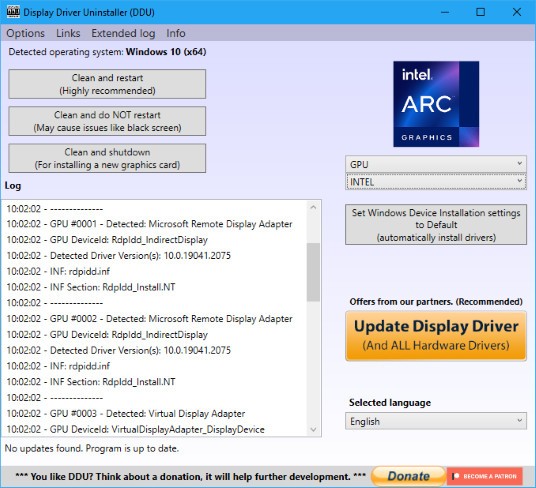
Display Driver Uninstaller, commonly known as DDU, is a specialized tool for completely removing graphics card drivers from a Windows PC. Developed by Wagnard (Ghislain Harvey), it has become the go-to utility for PC builders, hardware reviewers, and anyone dealing with stubborn driver issues that a standard Windows uninstall cannot fix.
The concept behind DDU is simple but important: when you uninstall a GPU driver through the Windows Control Panel or device manager, the process often leaves behind registry entries, leftover folders, configuration files, and driver store remnants. Those leftover fragments can cause everything from failed driver installations to graphical glitches, crashes, and performance drops. DDU exists to solve that problem by scrubbing your system clean so that when you install a new driver, it feels like you’re doing it on a freshly formatted machine.
Display Driver Uninstaller is especially valuable when switching between GPU brands. Going from an NVIDIA card to an AMD card (or vice versa) almost always requires a thorough driver cleanup, and DDU handles that transition better than any built-in Windows tool. It also supports Intel GPU driver removal, along with basic Realtek and Sound Blaster audio driver cleanup, which makes it useful beyond just graphics. DDU is a portable application, meaning it does not need a traditional installation and can run directly from a folder on your desktop or a USB drive.
What Are the Key Features of Display Driver Uninstaller?
DDU's primary job is to remove every trace of a graphics driver from your system, and it does that job extremely well. When you run the tool, it scans for and removes installed driver packages, associated registry keys, leftover folders and files, driver store entries, scheduled tasks, and services tied to your GPU software. After DDU finishes, the result is a system state that closely mirrors a clean Windows install, at least as far as graphics drivers are concerned.
The tool supports NVIDIA, AMD, and Intel GPUs, covering the three major graphics platforms. More recently, DDU has expanded to include cleanup for Realtek audio drivers and Sound Blaster audio drivers, which can also leave behind problematic remnants after uninstallation. For NVIDIA users specifically, DDU handles the removal of GeForce Experience (and the newer NVIDIA App) components, shader cache files, telemetry services, and context menu handlers that often persist after a normal uninstall.
One of DDU's most important features is its ability to run in Windows Safe Mode. Running in Safe Mode prevents the operating system from loading GPU drivers in the background, which means DDU can access and delete files that would otherwise be locked during normal operation. The developer recommends Safe Mode as the preferred method for the most reliable cleanup. DDU even includes an option to boot directly into Safe Mode from within its interface, making the process simple.
Additional options include the ability to prevent Windows Update from automatically downloading and installing drivers after the cleanup, which is critical on Windows 10 and 11 where the operating system aggressively pushes driver updates. You can also choose between "Clean and restart," "Clean and shutdown," or "Clean without restart" depending on your workflow. Before making any changes, DDU logs everything it does, and the developer recommends creating a system restore point as an extra safety net. The tool requires .NET Framework 4.8, runs as a portable application with no formal installation process, and supports 42 languages.
Is Display Driver Uninstaller Free to Use?
DDU is completely free to download and use. Wagnard distributes the tool through the official Wagnardsoft website (our links are direct), and there are no paid tiers, premium features, or subscription plans. Every function the tool offers is available to everyone at no cost. The developer does accept donations through Patreon, PayPal, and cryptocurrency for anyone who wants to support continued development, but donating is entirely optional and does not unlock any additional functionality.
Which Platforms Support Display Driver Uninstaller?
DDU is a Windows-only tool. It supports Windows 7, 8, 8.1, 10, and 11, in both 32-bit and 64-bit editions. The recommended setup is Windows 10 or 11 with .NET Framework 4.8 installed, which comes preinstalled on most modern Windows systems. DDU runs as a portable application, so there is no installer to deal with. You simply download the self-extracting archive, extract it to a local drive (not a network drive), and launch the executable.
Because DDU is specifically designed to interact with Windows driver infrastructure, including the driver store, registry, and system services, it has no macOS or Linux equivalent. GPU driver management on those platforms works differently at a fundamental level, and the types of driver conflicts DDU addresses are largely a Windows-specific problem.
The developer notes that using DDU on Windows Insider Preview builds is technically possible but done at the user's own risk, since Insider builds can introduce changes to driver handling that DDU has not yet been updated to accommodate.
What Are the Best Alternatives to Display Driver Uninstaller?
Driver Fusion from Treexy takes a broader approach to driver management. Rather than focusing exclusively on removal, Driver Fusion offers a full suite of tools, including driver updates from a database of over 35 million entries, driver backup and migration, device monitoring, and a driver cleaner module. The cleaner can remove leftover driver entries in much the same way DDU does, but Driver Fusion wraps that functionality into a larger package aimed at ongoing driver maintenance. A free version covers basic health checks and driver cleaning, while the premium edition adds scheduled scans, automatic updates, and priority support. If you need more than just a one-time cleanup and want a tool that helps keep all your drivers current, Driver Fusion is a solid option.
Driver Easy focuses on the update side of driver management rather than removal. It scans your system for outdated drivers across all device categories, not just GPUs, and offers one-click updates in its Pro version. The free trial lets you scan and identify outdated drivers, but automatic downloads and installs require a paid subscription. Driver Easy is best suited for users who want an easy way to keep all their hardware drivers up to date without manually visiting each manufacturer's website. It does not offer the deep driver scrubbing that DDU provides, so the two tools serve different purposes and can complement each other.
DriverMax is another general-purpose driver update tool that covers a wide range of hardware. It maintains a database of over 2.3 million device drivers and can scan, update, back up, and restore drivers across your system. Like Driver Easy, DriverMax offers a free tier with limited daily downloads and a Pro version that removes those restrictions. It supports scheduling, automatic installs, and creates restore points before applying changes. DriverMax suits users who want a set-it-and-forget-it solution for keeping drivers current, though it is more of an updater than a dedicated removal tool.