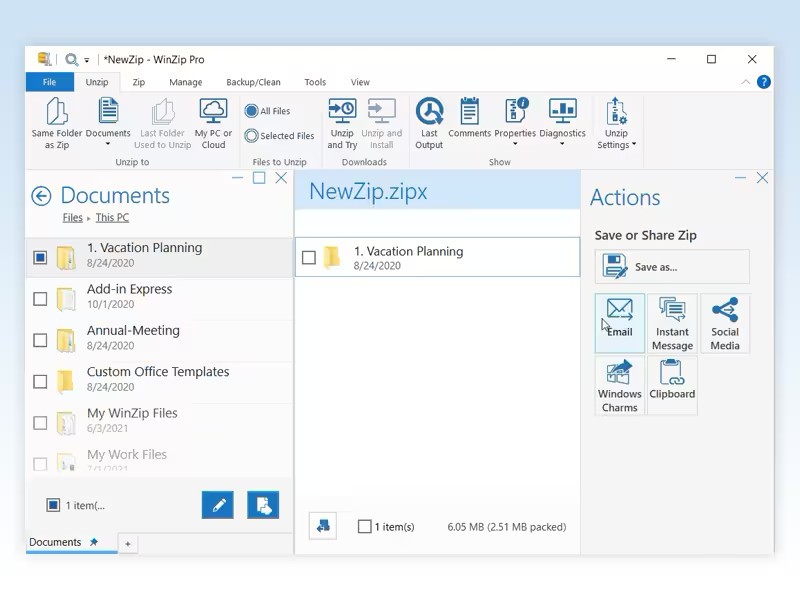
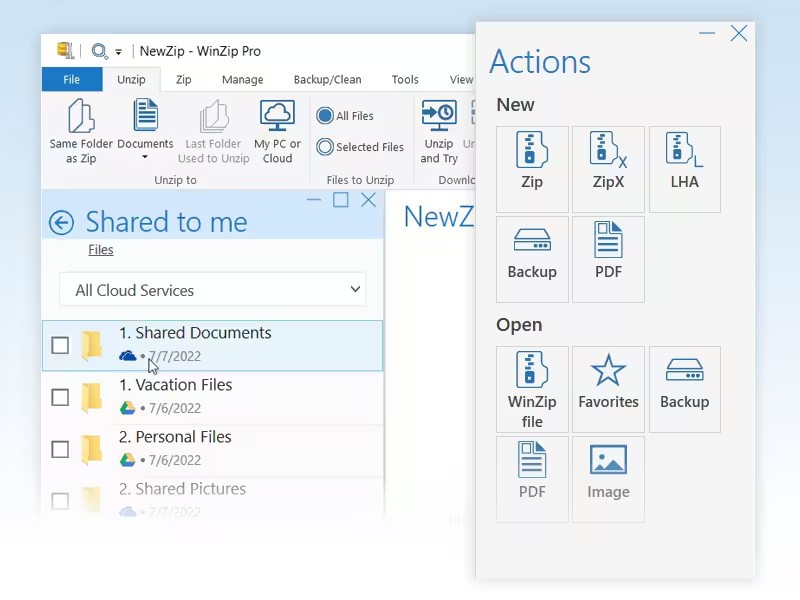
WinZip has been around since 1991, making it one of the oldest and most recognized file compression tools in the software world. At its core, the application handles the basic task of compressing files into smaller archives and extracting them when needed, but it has expanded well beyond that over the decades. Today, WinZip includes file encryption, cloud storage integration, PDF conversion, image management, and sharing features that turn it into a broader file management tool.
The software supports a long list of archive formats, including ZIP, ZIPX, RAR, 7z, TAR, GZIP, VHD, XZ, and more. You can create new compressed archives, extract files from existing ones, split large archives into smaller pieces for easier transfer, and build self-extracting ZIP files that recipients can open without needing their own archiver. For users who work with large files regularly, whether sending documents by email or organizing backups, WinZip provides a well-established set of tools that integrate directly into the Windows shell.
For anyone who grew up with computers in the 1990s or 2000s, WinZip was likely one of the first utilities you ever installed. It remains relevant today, though the landscape around it has changed dramatically. Free alternatives now handle most basic compression tasks perfectly well, which makes WinZip's paid model a harder sell for casual users. Where WinZip still holds an edge is in its extra features: encryption, cloud connectivity, and the kind of polished interface that business users tend to prefer.
What Are the Key Features of WinZip?
WinZip's compression engine handles files efficiently across all major archive formats. You can compress individual files or entire folders, and the ZIPX format offers stronger compression ratios than standard ZIP for certain file types. Batch processing allows you to compress or extract multiple archives at once, which saves time when dealing with large sets of files.
Security is one of WinZip's stronger selling points. The application supports AES 128-bit and 256-bit encryption, which is the same standard used by financial institutions and government agencies. You can password-protect your archives during compression, create read-only PDFs, and add watermarks to prevent unauthorized copying. For businesses that handle sensitive documents, these features provide a meaningful layer of protection during file transfers.
Cloud integration is built into the interface. WinZip connects directly to services like Dropbox, Google Drive, OneDrive, and iCloud, letting you compress, upload, and manage files across cloud storage without switching between applications. You can also share compressed files through email, social media, or instant messaging services directly from within WinZip. File preview lets you peek inside an archive without fully extracting it, which is useful when you are looking for a specific document in a large ZIP file.
Additional tools include a built-in image manager for resizing and converting photos before archiving, file conversion features that let you turn documents into PDFs, and an integrated file cleaner that can help free up disk space by identifying duplicate or temporary files.
Is WinZip Free to Use?
WinZip is a paid application. It offers a free trial period that lets you evaluate the software before purchasing, but after the trial expires, you will need to buy a license to continue using it. The software is sold across several tiers that range from a basic version to a professional edition with additional features like cloud backup, PDF management, and file recovery tools.
There is no permanently free version of WinZip that provides full functionality. If you are looking for a file compression tool that does not require any payment, several free alternatives exist that handle ZIP and other common formats without restrictions.
Which Platforms Support WinZip?
You can download WinZip on Windows, macOS, iOS, and Android. The Windows version is the most feature-rich and has the longest history, with full shell integration that lets you compress and extract files by right-clicking in File Explorer. The macOS version provides the same core compression and extraction features, though some of the more advanced Windows-specific tools may not be available.
Mobile apps for iOS and Android let you open, create, and share ZIP files from your phone or tablet. These mobile versions also support cloud storage connections, making it easy to download a compressed file from a cloud service, extract it, and work with the contents on the go.
What Are the Best Alternatives to WinZip?
7-Zip is the most popular free alternative and handles everything most users need from a file archiver. It is an open-source tool for Windows that supports ZIP, 7z, RAR, TAR, GZIP, and many other formats. Its own 7z format achieves strong compression ratios, often outperforming standard ZIP compression. The interface is functional but minimal, without the visual polish of WinZip. For anyone who simply needs to compress and extract files without paying for a license, 7-Zip is the go-to choice. You can download it directly from the project's website.
PeaZip is another free, open-source archiver that supports over 200 archive formats. It runs on Windows and Linux and offers a more modern interface than 7-Zip while still providing strong compression, encryption, and batch processing features. PeaZip also includes a built-in password manager for encrypted archives, which is a useful touch. It appeals to users who want free software with a friendlier look and broader format support than what 7-Zip offers out of the box.
WinRAR has been a fixture in file compression for nearly as long as WinZip. It is best known for its RAR format, which typically achieves better compression ratios than ZIP, and it supports a wide range of other formats as well. WinRAR offers a trial that technically never expires, though it prompts you to purchase after the evaluation period. It runs on Windows, macOS, Linux, Android, and FreeBSD. For users who regularly work with RAR files or want strong compression without switching to an entirely new format, WinRAR is a reliable option.
For Apple users, Keka is a lightweight macOS archiver that handles ZIP, 7z, TAR, GZIP, RAR, and other formats with a clean, minimal design. It is free when downloaded from the developer's website and available as a paid version on the Mac App Store if you want to support the project. Keka integrates well with macOS workflows and provides a simple drag-and-drop interface for creating and extracting archives. It is a strong fit for Mac users who want a native-feeling compression tool without the overhead of a larger application.