When installing or reinstalling Windows, it’s not uncommon to encounter unrecognized devices, missing drivers, or unusable network connections—especially when you don’t have internet access. For technicians and home users alike, this can quickly become a headache.
In situations like this that Snappy Driver Installer (SDI) really comes into its own. It can detect and install missing or outdated drivers, even in offline environments. Compact, portable, and efficient, it requires no installation and fits easily onto a USB flash drive, allowing you to troubleshoot any computer without wasting time.
In addition to enabling quick and precise installation, SDI offers an automatic system restore point feature for added security, helping to prevent unpleasant surprises in the event of incompatibility. Its interface is customizable, allowing you to choose or create a theme based on your preferences, and it supports no fewer than 27 languages.
Whether you’re troubleshooting a one-time issue or using it regularly, Snappy Driver Installer is a reliable, flexible, and fully customizable tool.
What Are the Key Features of Snappy Driver Installer?
Snappy Driver Installer is a fully portable tool: it does not need to be installed on the computer. Once downloaded as a ZIP archive, simply extract it to access its contents. The folder contains two versions of the program, one for 32-bit systems and the other for 64-bit systems. All you have to do is launch the appropriate version. Upon opening, SDI offers several download options: all available drivers, only those for network devices, or just the index files for a quick scan.
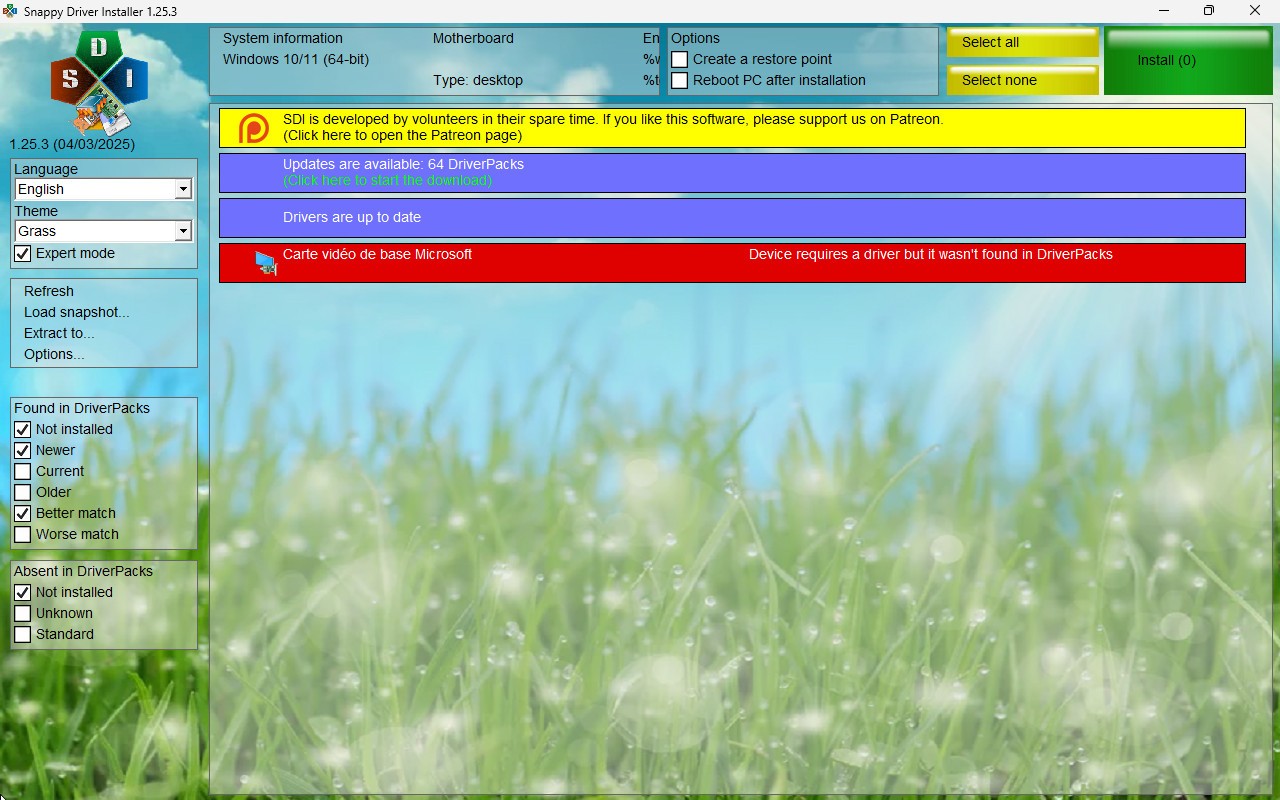
SDI works by automatically analyzing your computer's configuration. Using powerful algorithms, it accurately identifies the drivers needed for each hardware component, including network cards, chipsets, and audio and graphics devices. If you’ve chosen to download only the indexes, the software will then show you which drivers are outdated. All you have to do is check the ones you want to update, then click the install button. The whole process takes just a few clicks, without having to manually search the internet for the right file.
When SDI detects drivers that need updating, it recommends that you create a system restore point—a useful precaution in case of problems after installation. This option is available directly within the interface, which is available in French. It allows you to easily revert to a previous state if necessary. Whether you use the tool online or offline, its driver identification system ensures reliable updates tailored to your hardware.
Is Snappy Driver Installer Free to Use?
You can download and use Snappy Driver Installer for free. It is completely cost-free, with no premium version or paid features. The software is open source, licensed under the GNU GPL v3.0, which allows all users to freely access it, make changes to it, and contribute to its improvement. It contains no ads.
Which Platforms Support Snappy Driver Installer?
Snappy Driver Installer (SDI) is compatible with all versions of Windows, including server editions. The software supports Windows 2000 (Windows 2K), XP, Vista, 7, 8, 8.1, 10, and 11. It is portable, requires no installation, and can be run directly from an external storage device.
What Are the Best Alternatives to Snappy Driver Installer?
If you're looking for an alternative to Snappy Driver Installer to install and update your drivers, there are several equally effective tools available. Here are 3 solutions.
IObit Driver Booster is a simple and effective tool for updating your drivers. It scans your system and detects outdated drivers. It then allows you to update all devices and components with a single click. Its user-friendly interface is ideal for beginners, with the ability to schedule regular scans and create system restore points before installing drivers. Available in a free version, IObit Driver Booster also offers a Pro version with additional features. It is compatible with all recent versions of Windows.
Driver Easy is another handy utility for easily updating outdated drivers on Windows 7, 10, and 11. It scans your system and suggests the latest driver versions for you to download. The free version allows you to perform updates manually, while the Pro version offers automatic installation and technical support. Driver Easy also includes features for backing up and restoring drivers, as well as an option to run automatic scans. It is available in several languages.
Driver Genius is a powerful utility for managing drivers on your Windows 7 through 11 PC. It lets you update, restore, and uninstall outdated drivers with just a few clicks. The software also offers advanced features such as driver backup and hardware temperature monitoring. Available in a free version with certain limitations, Driver Genius offers paid editions for full access.