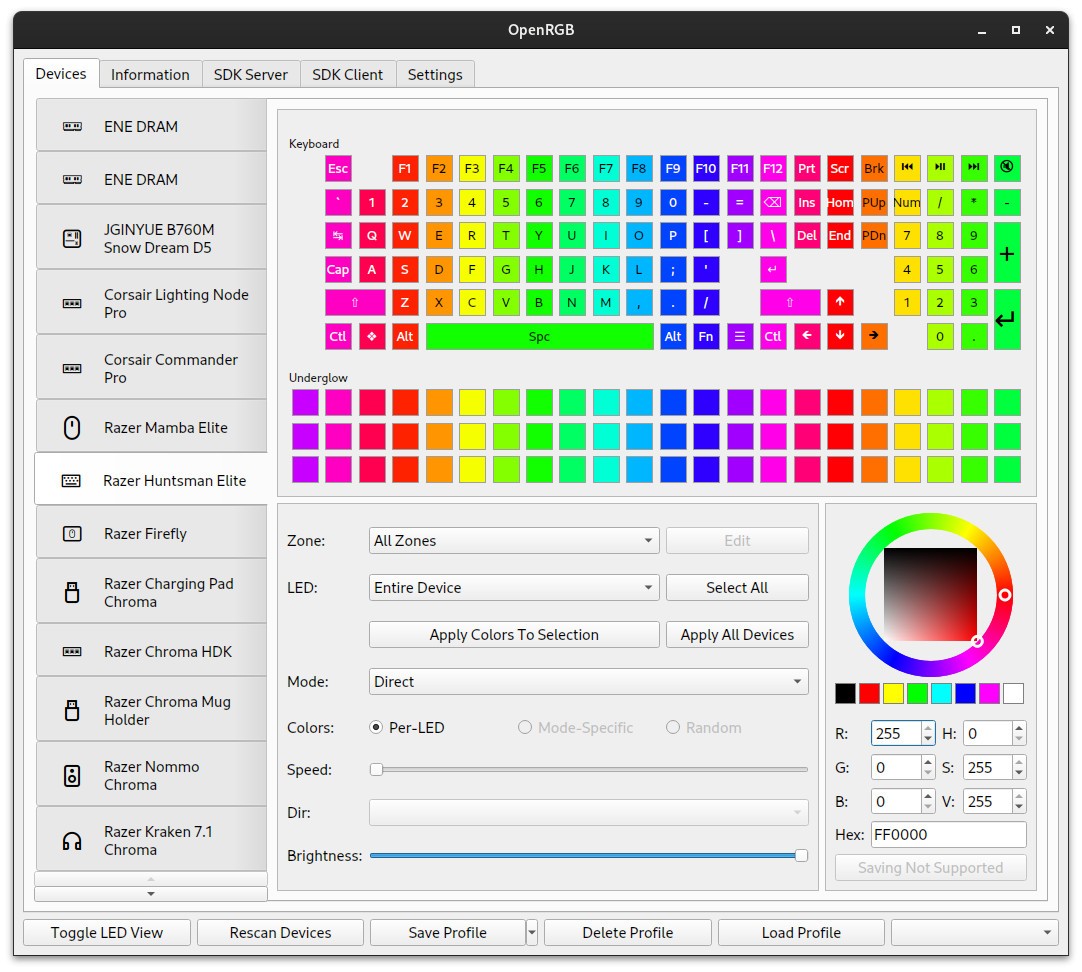
OpenRGB is a smart utility that allows you to manage all of your RGB lighting in one place. It is a free and open-source tool that is available on various platforms, including Windows, Linux, and macOS. OpenRGB is compatible with different devices, like keyboards, CPU coolers, motherboards, graphics cards, and smart lights. Users report that this tool is more intuitive and effective than proprietary manufacturer software.
The tool is quite lightweight, so it won’t drain your computer resources. It boasts a variety of features and plugins you can take advantage of to synchronize RGB lighting across machines and devices. The best part is - you have access to everything within a single interface.
What Are the Key Features of OpenRGB?
OpenRGB is a free, open-source RGB lighting manager. Its ease of use and extensive feature set make it a leader on the market that far outweighs bloated proprietary manufacturer software. The tool gives you access to all of your RGB lighting devices in a single interface.
You can connect OpenRGB to more than 2,500 different devices from a large variety of manufacturers, including RAM, motherboards, graphics cards, LED strips, Philips Hue smart lights, and more. OpenRGB is compatible with Windows, Linux, and macOS computers. The tool is relatively lightweight, which means it can always work in the background without draining your computer resources.
OpenRGB gives you direct access to controllers. With its help, you can manage all of your RGB lighting devices in the same place. What makes working with OpenRGB even easier is its advanced plugins. For example, you can use the effects plugin to create custom lighting patterns and sync your lights with music. The visual map plugin lets users visualize their RGB layouts and setups in the app. The fan sync plugin lets you set up custom fan speeds.
OpenRGB places a lot of emphasis on privacy: you don’t have to compromise yours to use the app. As such, there is no need to create an account, and the app doesn’t collect data that could potentially be exposed in a security breach.
Is OpenRGB Free to Use?
Yes, OpenRGB is a free utility. You can download and use it completely free of charge. The app operates under an open-source license, the code for which is widely available for community audits online. You can find the code on OpenRGB’s website.
Which Platforms Support OpenRGB?
OpenRGB is compatible with most modern operating systems. You can use the tool on your Windows, Linux, or macOS computer. The program is compatible with 64-bit and 32-bit Windows architectures, and macOS Apple Silicon and Intel processors. You can download the app for Linux via AppImage, RPM, or DEB.
What Are the Best Alternatives to OpenRGB?
While OpenRGB is an excellent tool, you may find a different app suits your needs better. Luckily, there are a few to choose from.
Aurora-RGB offers another way to manage all of your RGB lighting devices in one place. This PC utility is free and open-source, which adds to its appeal. The software is compatible with a wide array of brands, including Razer, Logitech, and Corsair. It is a great solution if you want to control your mice, keyboards, fans, and smart lighting from the same interface without needing to download the proprietary software from each individual manufacturer. Gamers will appreciate the ability to sync the app with games like GTA V and Minecraft to change lighting in accordance with what’s happening in the game. It is also quite lightweight, so it won’t impact your in-game performance. Aurora-RGB also enables users to monitor interesting computer statistics like CPU usage and memory.
Artemis RGB is another free and open-source utility for lighting management, though this one targets gamers specifically. The tool is compatible with a wide range of manufacturers, including Razer, Corsair, and ASUS. It mimics device layouts and displays them on your screen, so you know exactly where the lighting is. The app can integrate with games to adjust lighting to in-game events. It also integrates with other apps like Discord and Spotify. Because it is a gamer-specific utility, it doesn’t put pressure on your system or cause lags.
SignalRGB can be used as a lighting manager, but it also allows you to keep track of cooling and system monitoring. It is a free tool. The software is compatible with thousands of devices from manufacturers like Razer, Corsair, MSI, ASUS, and Logitech, just to name a few. You can set up the interface to mimic the layout of your device, so you can see exactly where light flows. Unlike other apps on this list, this one has a paid tier with advanced features and capabilities that include game integrations, advanced cooling, and effects.