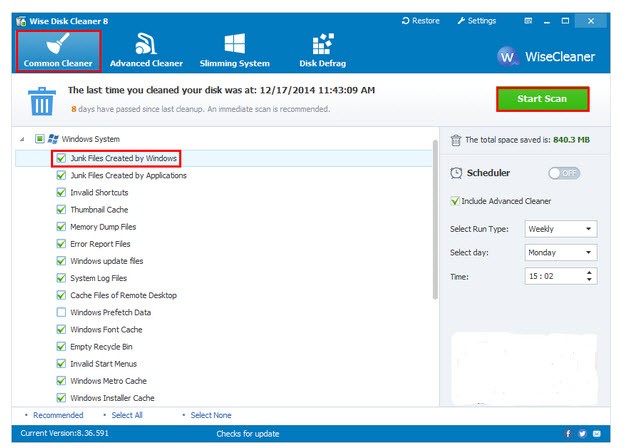
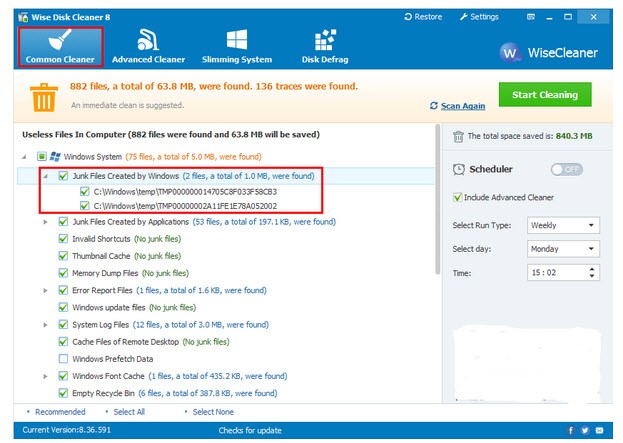
Wise Disk Cleaner is a free utility for Windows computers. It is meant as a lightweight substitute for the built-in Windows Disk Cleanup utility. The tool works by scanning your system and identifying and removing junk files that keep your computer slow. Those may include temporary and log files, as well as files you’ve already placed in the bin. But that’s not all! Wise Disk Cleaner also takes care of unnecessary browser and app files, such as cache, cookies, and browser history.
Once a full scan of your system is completed, the program will present a list of files it suggests deleting. You can review the list and make the final decision. This is helpful in case Wise Disk Cleaner tries to delete passwords or browser data you would like to hold on to.
What Are the Key Features of Wise Disk Cleaner?
Wise Disk Cleaner is a Windows utility for removing junk files from your computer. Using this tool or a similar alternative can speed up your system significantly and make your computer easier to use.
The app’s main functionality is scanning your system and removing files that you no longer need. Those may include browser history, cookies, cache, temporary files, log files, and files that have been placed in the bin. Wise Disk Cleaner’s advanced features allow users to filter by file type and search for specific types they would like to remove. To add to that, the program can also identify unnecessary files the operating system came with, such as sample wallpapers, empty folders, and installation files. Getting rid of all of these files that have been holding your system back will speed your computer up and make it a pleasure to use.
Other useful features of Wise Disk Cleaner include scheduled scans and automated system cleaning, which can be so helpful when you’ve got a lot on your plate. The tool is free and lightweight, so it won’t drain your computer resources. Unless you’re conducting a scheduled autoclean, the program will request your approval before deleting files permanently. You can also set it up so it doesn’t flag certain files, like passwords or cookies.
Is Wise Disk Cleaner Free to Use?
Yes, Wise Disk Cleaner is a free utility. You can use all of its basic tools completely free of charge. You will not come across any features hidden behind a paywall or any added fees you were not expecting.
Which Platforms Support Wise Disk Cleaner?
Wise Disk Cleaner is a Windows-only utility, so you cannot download and use it on any other operating system. It is compatible with Windows 7, 8, 8.1, 10, and 11.
What Are the Best Alternatives to Wise Disk Cleaner?
DaisyDisk is a Wise Disk Cleaner alternative for macOS computers. The program scans your system and gives you a visual overview of everything that’s taking up space. That way you can spot the biggest files easily. The utility doesn’t stop at your hard drive, but it can also scan cloud drives like Google Drive to give you the full picture. The best part is it only takes seconds to complete a scan. Once you have a good understanding of all the files that your computer has, you can decide what to do with them. Deleting them to make space is an option. You need to make a one-time purchase, which allows you to use the app on up to five different computers.
CCleaner is a tool for Windows computers that will help you get rid of unnecessary data, junk files, and everything else that may be taking up space on your computer and making your system slow. The junk files it targets include any temporary files created by browsers and applications. It also removes browser history, cookies, and unneeded internet files for an added level of security. Through CCleaner, you can choose which programs start up automatically when you turn your computer on. Eliminating programs you don’t use will speed up your system.
PrivaZer is a free solution for Windows computers. The tool focuses on removing unnecessary files and digital traces. It starts by conducting a deep scan of your system that goes beyond most similar tools. It then removes junk files in a way that is irreversible. In addition to removing hard disk files, it also takes care of browser history, cookies, and app histories. You can download PrivaZer or use its portable version that doesn’t require installation.