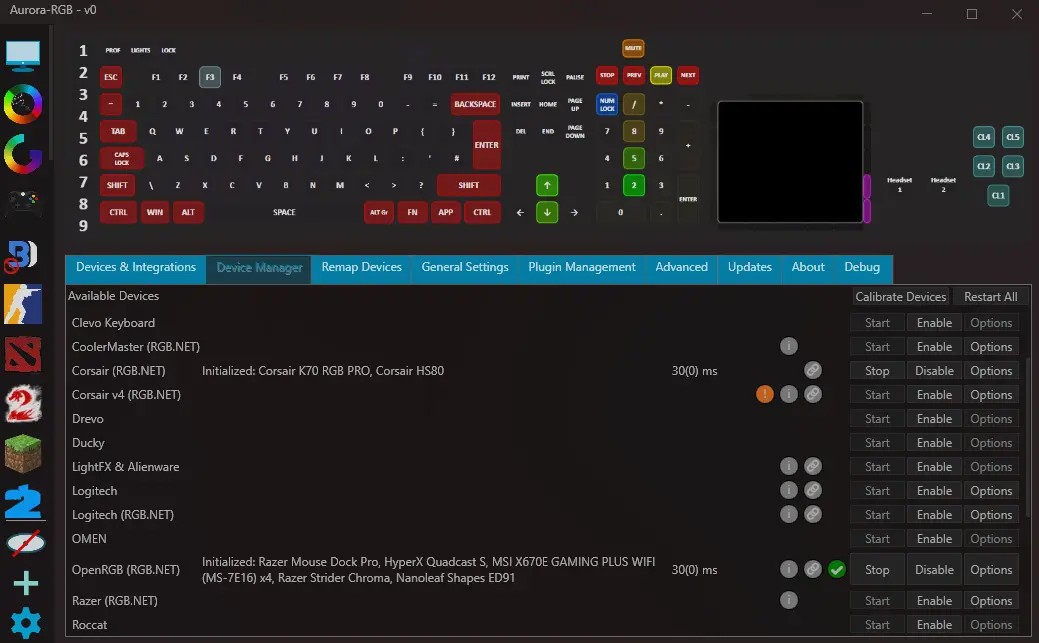
Aurora-RGB is an open-source lighting control application for PC gamers who want more from their RGB keyboards, mice, mousepads, fans, and compatible smart lights. Instead of relying on separate utilities for different brands, Aurora can control supported devices from one place. You can customize lighting effects, create profiles for different games, and make your peripherals react to what happens on screen.
The software's main appeal is its game integration. In supported titles, your keyboard lighting can reflect health, ammunition, ability cooldowns, team colors, and other gameplay information. Some effects are purely visual, while others provide useful feedback without requiring you to look away from the action. For example, a compatible profile might flash when your character takes damage or highlight keys associated with particular abilities.
Aurora also focuses on keeping its background resource usage low, which matters if you want lighting effects running while playing demanding games. Its layered effect system lets you combine lighting behaviors and build custom profiles, while support for several hardware brands makes it useful for mixed-device setups. However, compatibility depends on your specific peripherals and the game integrations available, so it's worth checking the supported device and game lists before installing it.
What Are the Key Features of Aurora-RGB?
Aurora-RGB's most distinctive feature is its ability to connect peripheral lighting to in-game events. Supported games can trigger effects that reflect your character's status or actions, making RGB lighting more than a decorative extra. In Counter-Strike 2, for example, effects can communicate health, ammunition, kills, and bomb-related events. In Dota 2, lighting can reflect health, mana, ability status, and kill streaks. Other integrations cover games such as Overwatch, Rocket League, Minecraft, and The Witcher 3.
The software supports a range of hardware brands, including Logitech, Razer, and Corsair, along with compatible keyboards, mice, mousepads, fans, and smart lighting products. You can manage supported devices through a shared interface instead of switching between several manufacturer utilities. However, not every product from a supported brand will necessarily work, so check the device compatibility documentation before relying on a particular feature.
Aurora's layered effects system gives you plenty of room to customize your setup. You can combine different lighting effects, define custom layers, adjust gradients, and create profiles for individual games or everyday use. The software also offers interactive keyboard effects, customizable lighting for when you're away from your desk, and options to change peripheral brightness without leaving a game. If you prefer to experiment before committing to a look, you can preview effects without launching the associated title.
Beyond lighting, Aurora can display useful system information on compatible keyboards, including CPU and memory usage and volume levels. Some game profiles also highlight key bindings or use lighting to represent details such as vehicle RPM, fuel, and braking in driving games. Scripting support gives more experienced users the option to create custom effects and extend functionality. Aurora's focus on low background resource usage is another advantage for gamers who want these features running during play.
Is Aurora-RGB Free to Use?
Aurora-RGB is free and open source, with all its features available without a paid subscription or premium license. You can download the software through its GitHub releases and use its lighting effects, game integrations, and customization tools without paying for access.
Its open-source approach also allows developers to inspect the code and contribute improvements. Keep in mind that some integrations may require configuration, and compatibility depends on your hardware and the particular game. Free access to the software doesn't guarantee that every device or feature will work with your setup.
Which Platforms Support Aurora-RGB?
Aurora-RGB is primarily designed for Windows gaming PCs. Its desktop application integrates with Windows games and compatible peripheral software, making it best suited to users who play on a Windows computer. There is no native support for macOS or Linux.
What Are the Best Alternatives to Aurora-RGB?
Artemis-RGB is a close alternative for users who want unified RGB control across multiple brands. It supports compatible peripherals and components through a plugin-based system, with customizable lighting effects and integrations that can react to games or other applications. Its modular approach makes it appealing if you want to extend your setup with additional plugins. Like Aurora, compatibility depends on the devices and integrations available.
SignalRGB offers a polished way to synchronize lighting across supported keyboards, mice, motherboards, fans, and other PC components. It includes coordinated lighting effects and game integrations, making it a good fit if you want your entire setup to respond together. The core software is free, although some optional features require payment. SignalRGB currently supports Windows rather than macOS or Linux.
OpenRGB is worth considering if you want a free, open-source tool with broad operating system support. It controls compatible RGB hardware from different manufacturers through one application and offers an SDK and plugin system for extending its capabilities. Unlike Aurora, its main focus is unified device control rather than an extensive collection of game-specific lighting profiles out of the box. It supports Windows, Linux, and macOS, making it a particularly useful option if you don't use Windows.