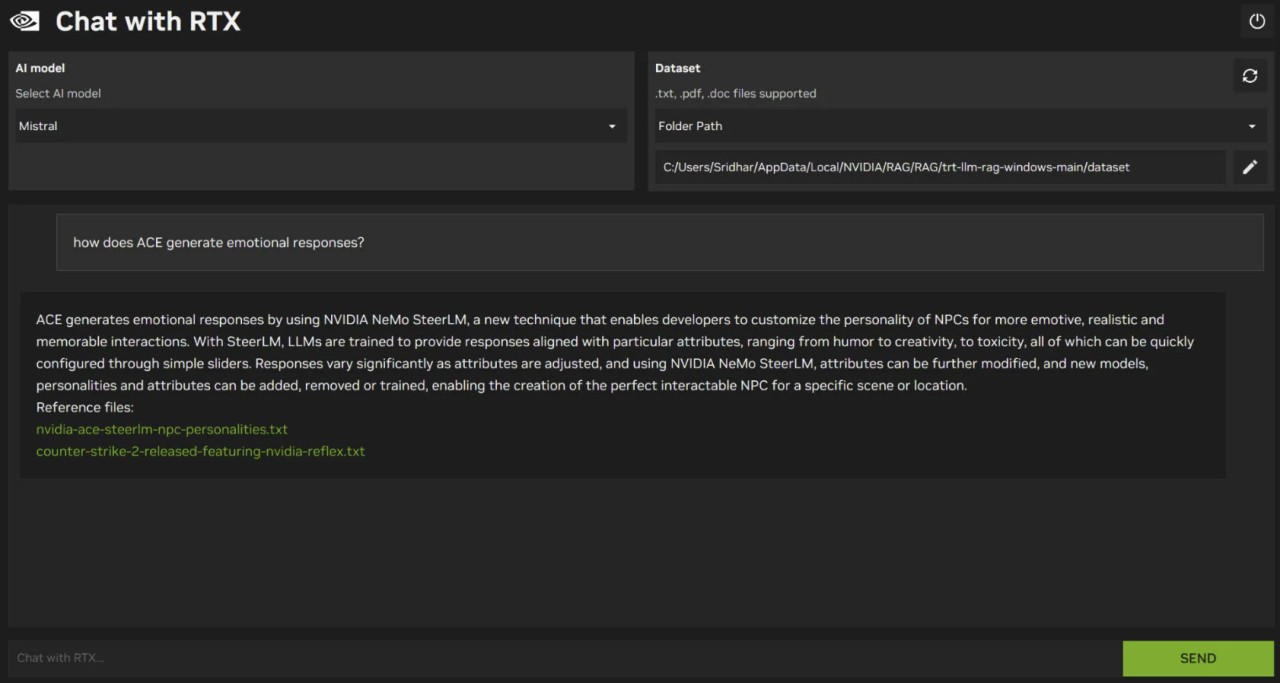
NVIDIA Chat With RTX is a local AI chatbot designed for PCs equipped with compatible NVIDIA GeForce RTX graphics cards. Instead of relying entirely on cloud-based AI services, it uses your computer's hardware to run AI models locally. This approach lets you experiment with generative AI while keeping your prompts and personal files on your device.
The application can work with your own documents and other local data to provide more relevant responses. This makes it useful for finding information in personal files, exploring notes, and getting answers based on content you already have. Its performance depends on your computer's hardware and the AI model you're running, with RTX GPUs providing acceleration for supported workloads.
Chat With RTX is part of NVIDIA's broader collection of tools for local AI development and productivity. The company also supports other AI applications and inference frameworks, including LM Studio and Ollama, which let users run compatible language models on their own hardware. However, Chat With RTX is particularly relevant if you want to explore a personalized chatbot experience built around NVIDIA's RTX platform.
What Are the Key Features of NVIDIA Chat With RTX?
Local AI processing is the main feature of NVIDIA Chat with RTX. The application runs supported AI models on your computer rather than relying entirely on remote servers. This can help keep your prompts and the files you use with the chatbot on your device. Local processing also means you can experiment with AI without requiring a continuous internet connection for model inference, although downloading software and models may require internet access.
Personalized responses using your files make the application useful beyond general chatbot conversations. You can connect supported local data sources so the AI can retrieve relevant information when answering questions. This can help you explore documents, locate details, and summarize information from your own content. The quality of responses depends on the model, the available data, and how accurately the system retrieves relevant material.
RTX GPU acceleration helps the application run supported AI workloads on compatible NVIDIA graphics cards. RTX GPUs include dedicated hardware designed to accelerate AI calculations, which can improve performance compared with running the same workload on less suitable hardware. Actual results depend on the GPU, available memory, model size, and other system specifications. Privacy-focused operation is another reason to consider Chat With RTX.Processing prompts and local files on your own computer can reduce the need to upload personal information to third-party AI services. However, local processing alone doesn't guarantee that every part of an application's operation is offline, so review the current documentation if you have strict privacy requirements.
Is NVIDIA Chat With RTX Free to Use?
NVIDIA Chat With RTX has been offered as a free demonstration application, allowing compatible RTX GPU owners to experiment with local AI. However, availability, supported hardware, and installation requirements can change. Check NVIDIA's official download page for the current version and licensing terms before installing it.
Which Platforms Support NVIDIA Chat With RTX?
NVIDIA Chat With RTX is designed for compatible Windows PCs equipped with supported NVIDIA GeForce RTX GPUs. Its hardware requirements are important because running AI models locally depends on sufficient graphics memory and processing power.
What Are the Best Alternatives to NVIDIA Chat With RTX?
GPT4All is a local AI application that lets you download and run supported language models on your computer. It provides a more general way to experiment with local chatbots without making NVIDIA RTX hardware the central requirement. Depending on your setup and selected model, you can use it to ask questions, generate text, and work with local documents. GPT4All is worth considering if you want an accessible interface for exploring different language models or use a computer that doesn't meet Chat With RTX's specific hardware requirements. Performance still depends on your processor, memory, and graphics hardware.
Ollama is a tool for downloading and running language models locally. It is particularly useful for developers and technically minded users who want to experiment with different models or connect local AI to other applications. Rather than focusing on a single chatbot interface, Ollama provides a way to manage models and run them through a local service. This makes it suitable for building AI-powered workflows and testing different models on your own hardware. Compared with NVIDIA Chat With RTX, Ollama offers a more flexible foundation for local AI projects, although some integrations require additional setup.
LM Studio provides a graphical interface for discovering, downloading, and running supported AI language models locally. You can use it to interact with models through a chat interface without building a custom application. It also supports local model experimentation and offers tools for developers who want to connect other software to a running model. LM Studio is a strong alternative if you prefer a standalone application with controls for managing and testing different models. Like Chat With RTX, it can support private, on-device AI workflows, but model compatibility and performance depend on your operating system and hardware.