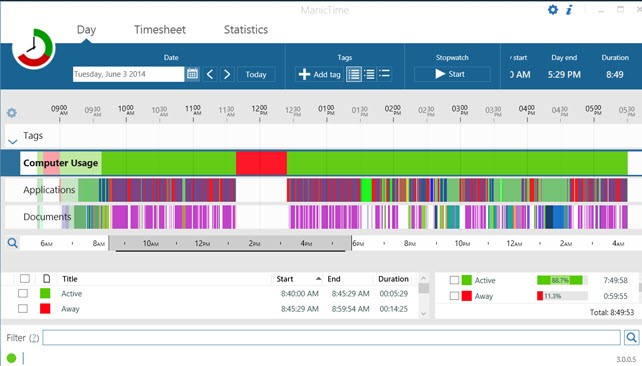
ManicTime runs in the background and records the applications you use, the windows you work in, and the websites you visit and documents you open, where supported. You don’t need to start or stop a timer every time you switch tasks: the software automatically maintains a record of your activity that you can review at any time.
Recorded activities can be assigned to a client, project, or task. Thanks to its automatic categorization system, ManicTime can apply tags to specific activities without requiring constant manual input. This makes it easier to track the time spent on individual projects and generate reports for time management and billing purposes.
The software also supports optional screenshot capture, allowing screenshots to be linked to the activity timeline. This feature helps you recall the context of a task and see what was displayed on your screen at a particular moment. You can configure the screenshot frequency and choose which applications are covered, depending on your needs.
ManicTime is available as a standalone application, a self-hosted server solution, and a cloud service. Hosting the server on your company’s own infrastructure gives you greater control over how your data is stored and managed. The software also provides an API and MCP integration, enabling you to connect tracking data to other tools, including AI assistants.
What Are the Key Features of ManicTime?
ManicTime automatically records computer activity in the background. It tracks the applications you use, periods of activity and inactivity, and supported information about the documents and websites you access. By monitoring active windows, the software helps distinguish between applications you are actively using and those that are simply left open.
The recorded information is displayed in timelines that let you review how your day was spent. You can select a specific period, examine the corresponding activities, and assign labels to associate them with a project, client, or task. Automatic categorization rules simplify this process, especially when you regularly perform similar activities.
A built-in search feature helps you quickly find previously recorded activities. You can also use the collected data to generate various reports, prepare timesheets, analyze how your working time is distributed, calculate billable hours, and track overtime. Depending on your configuration, certain reports can be generated automatically and sent by email.
ManicTime also includes features for attendance tracking and work time management. Its API makes it easier to integrate the software with other applications, while MCP integration allows compatible AI tools to query recorded data and, depending on the permissions granted, help organize and categorize activities.
Is ManicTime Free to Use?
ManicTime offers a 30-day free trial. After the trial period ends, you’ll need to choose a license or subscription that matches your requirements.
Available plans vary depending on whether you use the software individually, work as part of a team, or want to centralize activity data on a server. Cloud plans are subscription-based, while other options support local installations and self-hosted deployments.
Which Platforms Does ManicTime Support?
The ManicTime desktop client is available for Windows, macOS, and Linux. Windows users can also choose a portable version that runs without a traditional installation. Mobile apps are available for Android and iOS, allowing you to extend activity tracking across different devices.
The server solution can be installed on Windows or Linux. It can also be deployed using Docker or through the Azure Marketplace. In a business environment, the server centralizes data from connected devices and allows users to access shared reports.
If you prefer not to manage your own infrastructure, ManicTime also offers a cloud-based service. This eliminates the need to install and maintain an internal server, as hosting and service updates are handled by the provider. Depending on the configured access permissions, you can access your data from different locations.
What Are the Best Alternatives to ManicTime?
WhatPulse is an interesting alternative for analyzing computer usage. It measures keyboard keystrokes and mouse clicks, providing detailed statistics about your computer habits and the applications you use. Its visualizations help you identify the keys you press most often and compare your usage patterns over time. WhatPulse also monitors network traffic, showing how much data is sent and received and helping you identify applications that consume the most bandwidth. You can configure alerts to notify you when network usage reaches specific thresholds. Statistics can be viewed within the software and, depending on the features you use, shared or compared with those of other users. Importantly, WhatPulse counts keystrokes without recording the actual text you type.
ActivityWatch is another alternative, particularly suited to users who value open-source software and data privacy. This free, open-source tool automatically records application usage and periods of activity and inactivity. Its browser-based dashboard lets you explore statistics and review your activities throughout the day. You can also categorize applications and websites to better understand how you spend your time. Browser extensions for Chrome, Firefox, and Edge can extend activity tracking to web browsing, while community-developed extensions provide additional integrations with certain code editors. ActivityWatch stores its data locally on your device rather than automatically sending it to a cloud service.
RescueTime is designed for users who want to understand their digital habits and improve their productivity. It automatically tracks the time spent on applications and websites, then generates reports showing how your day is divided among different activities. These insights can help you identify potential distractions, recognize patterns in your focused work, and better understand how you allocate your time. Goals and alerts help you monitor your habits, while website and application blocking features can reduce distractions during focused work sessions. RescueTime also offers features and plans for professionals and teams who need to track projects and manage timesheets.