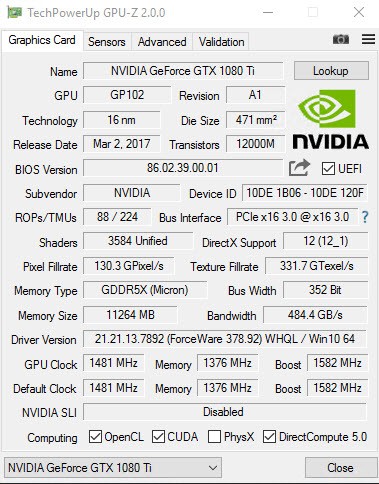
GPU-Z is a small utility used to get statistics for your graphics card. Opening it, you are immediately informed of which graphics card is used. It displays the name of the graphics card, manufacturer, and technical specifications. It is very useful when Windows settings do not show the actual model, and when you have to confirm the driver version.
Gamers, PC assemblers, and technicians usually use GPU-Z to get the list of the graphics hardware in a quick and precise way. It also comes in conveniently in cases of purchasing or selling hardware, troubleshooting drivers, or checking compatibility of software and games.
GPU-Z does not make any settings or performance increases. It does not overclock the graphics card or deal with drivers. It only aims at presenting information. The tool retrieves the data in the system and displays it without alterations.
GPU-Z is fast and light because it specifically targets a single component. It starts fast and does not contain any background services. You can open access information you require and close without affecting the system performance.
What Are the Key Features of GPU-Z?
GPU identification is the main characteristic of GPU-Z. It shows the specific model, vendor, architecture, and process of manufacture of the graphics processor. This level of detail makes you know more about the GPU, especially where model names are similar. The details of the memory are also presented in GPU-Z. You can see memory type, memory size, bandwidth, and bus width. This assists you in confirming the settings of the graphics card and whether they are satisfactory to you.
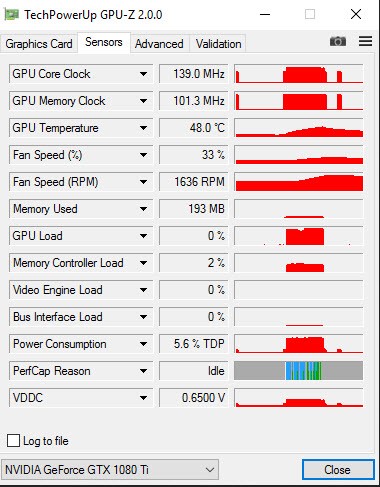
A second major feature is information about the driver. The version of the driver in use and simple information are presented in GPU-Z. This can help you check your system to ensure that you have the up-to-date version or use a compatible driver without going through other menus. The tool also indicates simple sensor values, such as clock speeds and some simple performance values. These readings are real-time, which means that you can confirm that the GPU is on and it is working. Technological GPU-Z, however, lacks in-depth monitoring and graphing as well as long-term recording.
GPU-Z is updated frequently to accommodate the emerging GPUs. New graphics cards from NVIDIA, AMD, and Intel are regularly added in the updates. This makes the tool dependable as new hardware is released to the market. Its interface is text-based and simple. It does not center on glitz, but on conciseness. The layout allows one to find the information very fast and without distraction, though some might consider it outdated. In general, GPU-Z is more concerned with accuracy, speed, and dependability rather than with advanced features.
Is GPU-Z Free to Use?
GPU‑Z is free. You can install it free of charge. None of the subscriptions, premium levels, or paid features. All the features become available immediately after installation. You do not have to create an account, sign in, or have some form of trial period to restrict your usage.
Since GPU-Z is a tool that can only provide information, its licensing remains easy. It is used by people for personal use as well as troubleshooting and learning about hardware. The standard version does not have paid upgrades. The free edition is sufficient if you only require the graphics card specifications. It does not require the purchase of any additional tools to use the core features.
Which Platforms Support GPU-Z?
GPU‑Z is designed for Windows. It can run on the latest version of Windows and operates on 32- and 64-bit systems. The update notes and installer ensure compatibility with active maintenance to the present Windows releases. Updates are made to always ensure compatibility with newer hardware, laptops, and professional GPUs.
MacOS and Linux are not supported at all. GPU-Z uses Windows-specific access to the graphics hardware, therefore making it Windows-specific. Users not on Windows should use different tools. GPU-Z does not require a web browser or the internet. Once installed, it works locally and reads information directly out of the system and, therefore, can be used offline.
What Are the Best Alternatives to GPU-Z?
Another widely used tool is CPU-Z, which concentrates on the CPU. It provides a detailed report on the processor, memory, and motherboard instead of graphics cards. CPU-Z is useful when you want to learn more about your CPU and RAM, but it does not have the same kind of in-depth functionality it offers regarding the GPU as GPU-Z. Many users choose to download CPU-Z when they only need quick access to processor and memory details.
Belarc Advisor has a more widespread strategy. It gives a comprehensive scan of the whole system and generates a report about hardware, installed software, and updated status, in a browser form. It provides a full picture but does not focus on the details of the GPU or readings in real-time. It is more suitable for general system audits rather than auditing graphics hardware. Some users prefer to download Belarc Advisor to get an overall view of their system rather than focusing on a single component.
CrystalDiskInfo is a program that concentrates on storage devices instead of graphics hardware. It displays hard drives and SSDs, such as health status and basic performance indicators. Though it is not colliding with GPU-Z, it can be used in the same way, as it provides a clear overview of one of the hardware categories. People often download CrystalDiskInfo when they want to check disk health without using complex monitoring tools.