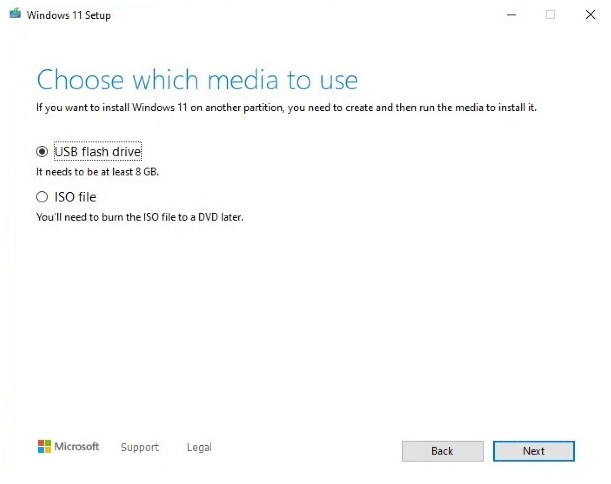
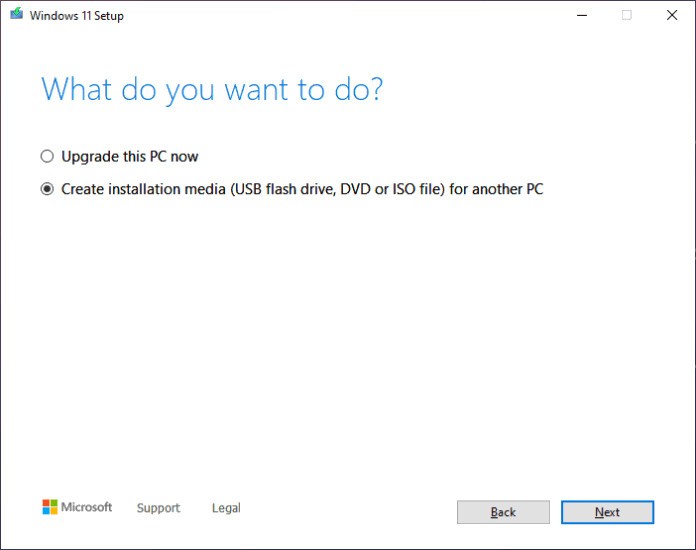
Microsoft developed the Windows 11 Media Creation Tool, a utility for creating Windows 11 installation media (Home or Pro). It is useful when you’ve had problems with Windows Updates or when you require a total reinstallation or a new installation. The tool creates a bootable USB drive or DVD to install Windows 11, to realize a clean install on a new computer, or even wipe an old computer and start fresh.
It also downloads the latest Windows 11 files without leaving you out of sync with those on the Microsoft server, and you do not have to deal with corrupted or incorrect disk images you may receive elsewhere. It is convenient for technicians who have to manage many machines and for ordinary users who need a good reset. It is also a tool that allows you to create an ISO file that can be used within a virtual machine or in the setup of a personal computer. It is minimalist and provides no additional features; it is a simple method for creating installation files.
What Are the Key Features of Windows 11 Media Creation Tool?
The Windows 11 Media Creation Tool has a rather simple purpose; however, it addresses the most common Windows installation scenarios. Its key advantage is that it downloads a clean version of Windows 11 directly from Microsoft, without using third-party sources or older builds. It allows you to select a bootable USB file or an ISO file. The files contain both Windows 11 Home and Windows 11 Pro, so you’ll just have to choose upon installation.
This tool is useful when installing a new computer, getting a stubborn update to work, or installing Windows in a virtual machine. The Windows 11 Media Creation Tool uses default settings to select the best options for your device, but you can modify the language, version, or architecture if you prefer.
For users upgrading from Windows 10, it offers a simpler process. It also verifies hardware compatibility and informs you if your system does not meet Windows 11 requirements. The tool can remove the confusion that can arise when downloading a particular ISO file manually, since the download and creation of the media are handled as a single flow.
There is no need to learn about partition schemes, file systems, or image verification; the tool does it all behind the scenes. Its strongest point is its reliability, as it runs on official Microsoft servers and always produces media compatible with regular PCs.
Is Windows 11 Media Creation Tool Free to Use?
Yes. Windows 11 Media Creation Tool is completely free. It is a publicly available download resource provided by Microsoft, and is therefore free to create an installation medium or download an ISO. It only needs a legitimate Windows license to activate later. It is free to download and execute by anybody.
Which Platforms Support Windows 11 Media Creation Tool?
The tool is Windows-only and supports only 64-bit versions of Windows starting with Windows 10. It is used by the majority of its users on Windows 10 or Windows 11, as older operating systems such as Windows 7 or 8.1 are no longer supported for running the tool and may not create contemporary installation media.
It is incompatible with macOS or Linux. Such users can still download a Windows 11 ISO on their own and make other software media (with tools such as Ventoy or Rufus). The tool also fails to generate installation media in ARM-based PCs, but it can only generate files in x64 architecture.
Individuals who install Windows 11 on a new computer often install the tool on an existing Windows machine, then transfer the bootable USB to the desired computer. It is still the most accessible to users already within the Windows system and requires a clean, reliable method for assembling installation files without resorting to more complex imaging applications.
What Are the Best Alternatives to Windows 11 Media Creation Tool?
Ventoy does not operate in the same way as conventional USB-creation software. Avoiding the time-consuming process of reformatting the USB drive every time you need to install another ISO, Ventoy allows you to simply copy any number of ISO files to the drive like standard files. Upon booting the system from that USB, Ventoy will display a menu, allowing the user to choose any ISO on the device. The strategy is wonderful for technicians or anyone who continually tests or installs various operating systems. Ventoy can support Windows but also Linux distributions, and a range of rescue environments. Users like it because it saves them time, eliminates repetitive formatting, and offers greater customization than single-purpose tools. Many people download Ventoy once and then rely on it for all future ISOs because it keeps things simple.
ISO to USB is a simple utility intended for users who just want to copy an ISO file to a USB drive without the added complexity. It emphasizes Windows ISOs, thereby simplifying the process for an easygoing beginner who needs a straightforward way to create installation media. The interface is very sparse: you pick the ISO and the USB drive, then start writing it. It does not have advanced features like partition customization or multi-iso support, but its simplicity attracts casual users. It is not heavy, no technical skills are required, and it takes a few steps to complete the job.
Users often download ISO to USB for quick tasks when they don’t need anything advanced.
Rufus is among the most used programs to make bootable USB drives, particularly among IT professionals. It offers rapid formatting, a broad selection of ISO images, and allows users to create custom boot options, partition layouts, and file systems, should they wish. Such control renders it to both casual and power users who desire to introduce some changes to the installation media. Rufus is fast and reliable, and it is frequently updated to support new versions of Windows and boot loaders. It can even provide Windows installation media, which avoids some hardware requirements, but the user must be aware of the risks of using those options. People download Rufus regularly because it remains one of the fastest tools for creating bootable USB drives.