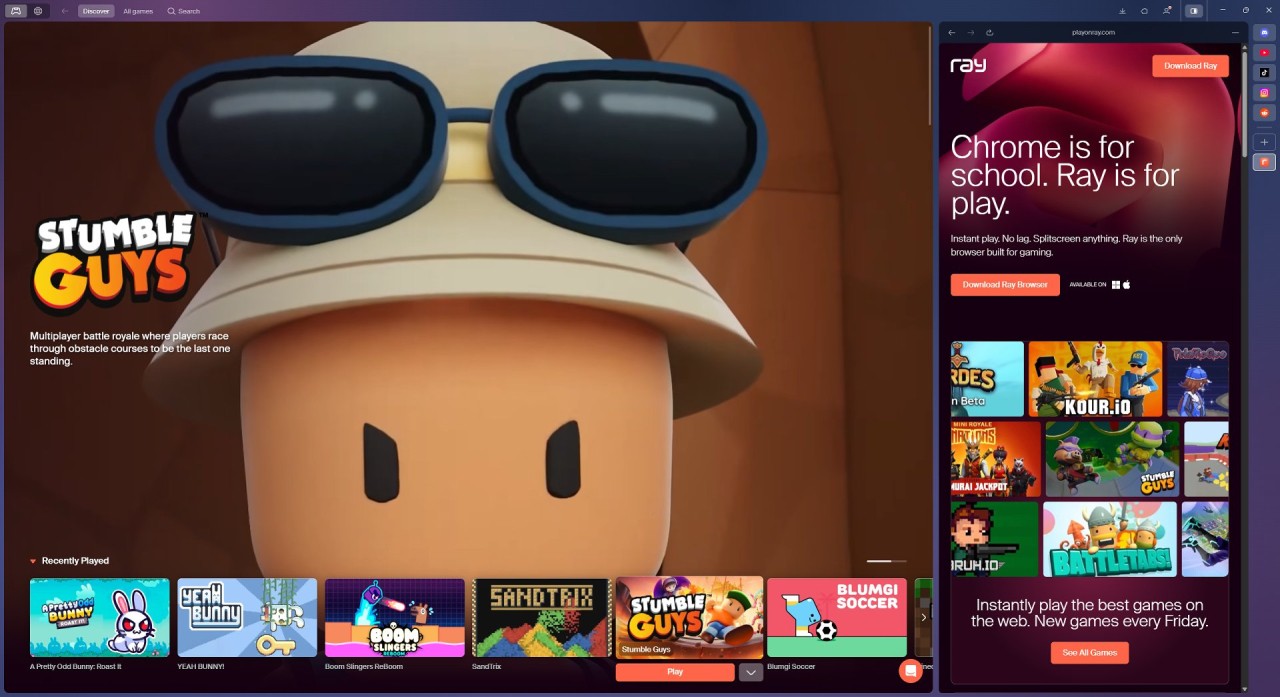
Ray isn’t your typical work-or-school browser. It is built around gaming. Instead of extensions, productivity tools, or a clean search bar, Ray is devoted to in-browser gaming, which is smooth and fast. It cuts the gap between wanting to play and actually playing.
Normal browsers start with a blank page or search engine, whereas Ray takes you to an entertaining gaming portal. You are able to jump into games without additional launchers or clumsy installations. It also has split-screen multitasking, which allows you to have Discord, YouTube, or other applications running as you play. This makes the gaming experience more seamless without switching tabs.
Ray runs on the same engine as Chrome and Chromium, so it feels familiar right away. It doesn’t have the clutter of extra features and focuses on what gamers need. It’s still in beta, but the goal is clear; it’s built for gaming, not general browsing like most others.
What Are the Key Features of Ray?
The largest attraction of Ray is its game discovery portal. Instead of having to search through random places for browser games, you can access them all at a single location. Just click and play; no installs, no long loads, no extra accounts. New games are regularly updated to make the library fresh.
Split-screen is another major aspect that is built in. Discord, music, or guides are often used by gamers during play, and there are usually multiple tabs or windows open. Ray makes this easier; you can game on one side and chat or stream on the other. There is no switching needed.
Ray is also focused on performance. It claims to be 30 percent faster in WebGL rendering than Chrome on MotionMark tests, which translates to reduced lag and more stable WebGL-intensive games. Numbers can sound arbitrary, but you will notice smoother play in heavier games.
Ray is made on a Chromium platform and has strong built-in security. It is a Finnish firm that adheres to European GDPR; thus, it does not sell or store personal information to advertise to you, as many other mainstream browsers do. Ray also lets you create a user account, pick a game, and jump right in. Any game accounts remain between you and that game, not Ray.
Is Ray Free to Use?
Yes, Ray is entirely free. No subscriptions, no monthly payments, no enrollments. Browse the portal, play games, and play in split-screen without paying. Individual games may offer in-game purchases.
Ray also lets you launch cloud services such as Amazon Luna and Xbox Cloud Gaming in the browser, as long as you have accounts on those platforms. It can be used as a platform to host both browser games and cloud games.
Which Platforms Support Ray?
Ray is based on Chromium, and thus it can be used with modern desktops. Today, it is all about Windows, but its Chromium base allows it to be cross-ported to macOS and Linux with relative ease. You can use it like Chrome for everyday browsing, with standard websites, videos, and web applications working well.
There is no mobile version yet, but it is not surprising since browser games are made to be played on desktop with a keyboard and mouse. The majority of portal games are desktop-friendly, and split-screen is best on a bigger screen.
Ray does normal browsing, although it is created for playing games. Watch videos, check your email, or use work applications as you would normally. It is also not as heavy as most browsers, with features that may slow it down when opening multiple tabs. Platform support is expanding as the development team keeps adding more options, though desktop users, especially those streaming or playing in-browser, are the main target.
What Are the Best Alternatives to Ray?
Ray is in the gaming-first browser niche, but there are some alternatives that approach gaming support from a different angle. Each one has something different to offer: Opera GX focuses on controlling the system and its customization, Razer Cortex maximizes performance, and Vivaldi customizes the system to the end.
The most renowned gaming browser in this day and age is Opera GX. It is loaded with default applications: CPU and RAM caps, Twitch and Discord integration, custom GX Corner with news, and a flashy interface with sound effects and theme choices. It has many more capabilities than Ray. Opera GX fits gamers who like tweaking and customizing settings. It feels busier than Ray, which is very straightforward. It is not so much about instant play but more about creating a gaming hub.
Razer Cortex is not a browser, but it should be included here, as many gamers use it with their browsers. Cortex optimizes the performance of your system and frees PC resources to execute games more easily. It does not spend time on game discovery like Ray does; rather, it ensures your system is in optimal condition regardless of what you play.
Vivaldi is a very different choice. It is not directly aimed at gaming, but its extreme customization is attractive to power users, including gamers. You are able to stack tabs and tab panels, rearrange, use keyboard shortcuts, and customize the browser to your workflow. Vivaldi doesn’t come with game portals or flashy extras like Ray or Opera GX. However, it can be a good option for players who want to create their own setup, perhaps with cloud gaming or Twitch streaming.