Shadow PC is a complete remote Windows computer that you access over the internet. Rather than streaming a limited selection of titles like most gaming services, Shadow hands you an entire Windows environment. You can install anything a physical PC would run: games, software, launchers, utilities, creative tools, and mods.
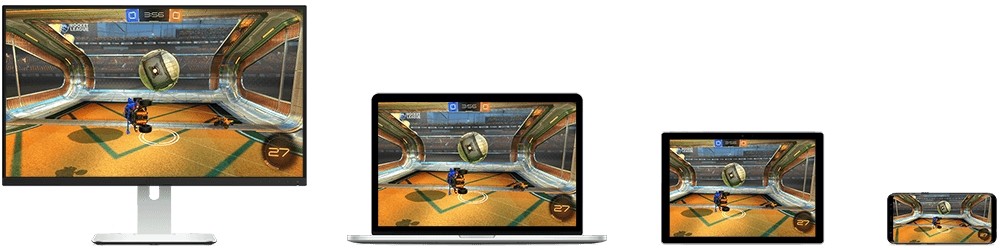
Think of it as a high-end machine stored in the cloud. You connect through the Shadow app on your phone, laptop, tablet, smart TV, or directly through a browser. Your own device does none of the heavy lifting; everything runs on Shadow's remote hardware instead.
This makes it a strong option for anyone who does not own a powerful gaming PC, or for anyone who wants a single capable machine they can reach from anywhere. Once you are logged in, you are looking at standard Windows and using it the same way you would a physical computer. Install games through Steam or Epic, work in Office apps, manage files, or run any other Windows software. As it is a full cloud PC, the quality of the experience depends heavily on your internet speed and latency.
The Shadow app is available to download on Windows, macOS, Linux, Android, and iOS, or you can access your account directly through a web browser.
What Are the Key Features of Shadow PC?
The defining feature of Shadow PC is that you get a fully capable Windows desktop running on remote servers, with complete control over it. You install what you want, adjust settings how you like, and use the system however you need. Steam, Epic Games Store, Ubisoft Connect, Battle.net, GOG, and any other platform are all available because there is no curated library restricting what you can run. Mods, custom tools, and productivity software all work just as they would on a local machine.
Shadow's hardware supports high-end graphics features, including RTX and DLSS, which means visually demanding games run well even if your own device is underpowered. All processing happens remotely, so your phone, tablet, or aging laptop functions only as a screen and input device. The app automatically adjusts the video stream to match the native resolution of whatever you are using.
Peripheral support is broad. Controllers, keyboards, and mice all connect through the device you are streaming to. A second screen can also be added. For TV use, Shadow runs on Android TV and similar devices. On mobile, pairing a controller gives you a setup comparable to a desk environment. Shadow is not limited to gaming either. Because it is a full Windows machine, plenty of users run it for productivity work, video editing, remote professional tools, and creative software.
Is Shadow PC Free to Use?
No. Shadow PC runs on a monthly subscription. The plan you choose determines the hardware specifications you get access to. The Shadow app itself is free to download, but an active subscription is required to use the cloud PC. There is no free tier for the cloud computer.
Which Platforms Support Shadow PC?
Shadow PC is built to run on virtually any connected device. The app is available on Windows, macOS, Linux, Android, and iOS. It also runs on Android TV and most smart televisions, letting you game or work on a large screen without a physical computer attached.
A browser version is available for desktop operating systems if you prefer not to install the app, which means your cloud PC is reachable from almost any machine, including shared or borrowed hardware. Shadow detects your display resolution and scales the stream automatically for a clean image regardless of screen size.
A fast, stable connection is important for the best experience. Wired Ethernet or high-speed Wi-Fi is recommended, particularly for gaming or other performance-intensive tasks. Devices that support 5 GHz Wi-Fi or a reliable wired connection will get the most responsive experience since the remote PC is entirely dependent on network quality. Standard peripherals, including keyboards, mice, and controllers, work when connected to the device you are streaming from.
What Are the Best Alternatives to Shadow PC?
Amazon Luna is a cloud gaming service that streams games hosted on Amazon's servers rather than giving you a full computer. Instead of installing your own software, you subscribe to game channels and access the titles included in them. Luna is straightforward to use and runs on Fire TV devices, phones, tablets, and PCs. It suits players who want quick access to a game library without any setup or hardware decisions. It does not offer the flexibility of a full Windows environment the way Shadow does, but it provides an accessible entry point to cloud gaming with minimal friction. Some players also download small companion tools to monitor connection quality or organize their linked libraries.
GeForce Now from NVIDIA streams games you already own on platforms like Steam, Epic, and Ubisoft Connect, running them on powerful remote NVIDIA hardware. Unlike Shadow, it does not give you a full Windows desktop, but it lets you play demanding titles on low-powered devices with RTX support and strong visual performance. It is a clean, focused solution for players who want cloud gaming without managing a full operating system. GeForce Now is fast and visually capable across multiple platforms, but it is less flexible than a cloud PC for anything beyond gaming.
Steam Link is a free option that works differently from both Shadow and GeForce Now. Rather than using cloud servers, it streams games from your own gaming PC to another device on the same local network. This is ideal if you already own a capable machine and simply want to play on a different screen, such as a tablet or TV, without moving hardware around. Performance is governed entirely by your home network quality. Steam Link is not a cloud PC replacement, but for users who have a solid gaming setup and want to extend where they can play within their home, it is a practical and cost-free solution.