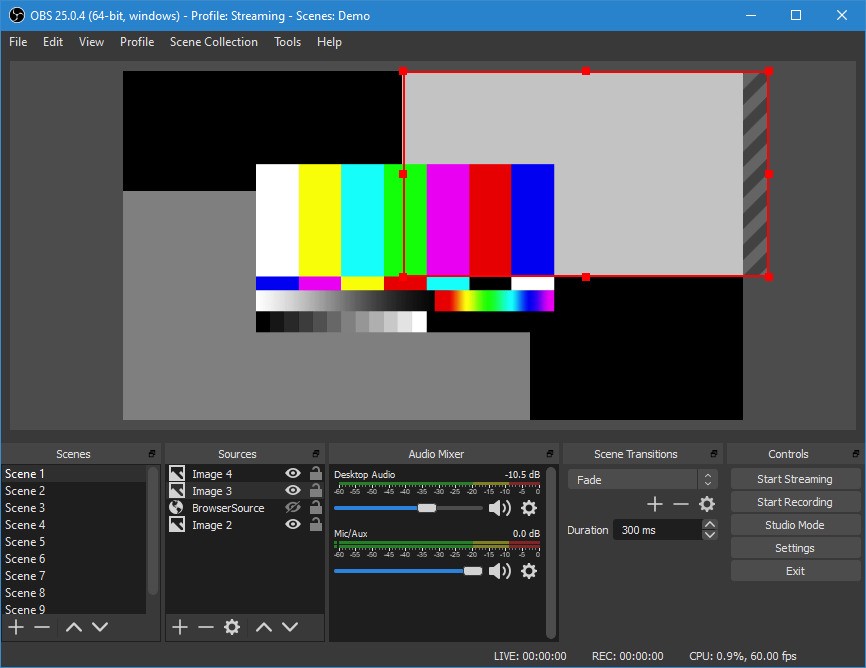
OBS Studio is a free, open-source application that allows you to stream and record videos. Gamers, teachers, streamers, and businesses using it require complete control of their broadcasts. The OBS also allows you to make scenes manually as opposed to using templates and can be configured to use a variety of inputs: webcams, microphones, game windows, images, text, browser windows, or capture cards.
The software is open source; hence, it is used in numerous ways by people. Others only do simple tutorial recordings, and others create elaborate setups of a scene to use on a live show. OBS has no limits on the number of scenes you can make, what transitions you apply or how you set up your production.
You can add audio and video simultaneously, filter, reshape layouts, and switch scenes without disrupting the stream. It is simple enough to start with, but strong enough to be used by the creators who require a technical workflow. The community offers an active community, which is the extension of core functionality.
What Are the Key Features of OBS Studio?
Real-time video and audio capture is the key advantage of OBS Studio. With a built-in mixer, you can combine multiple video sources, including webcams, screen captures, or windows, and also control audio. The mixer provides options such as filters such as noise suppression, noise gate, gain control, and compression that provide a cleaner sound without having additional tools.
The scene system is vital. You can make an unlimited number of scenes, such as Starting Soon, Gameplay, Camera Only, Break Time, etc., and transition between them. These transitions may be customized, or you may add your stinger videos. Hotkeys enable a quick change of scenes or the deactivation of sound during a broadcast.
The dock UI makes the layout fully customizable. The panels can be moved around, detached into individual windows, and stored in individual streams or recordings. Studio Mode gives you the option of previewing the scenes prior to going live so that you see that everything is right before the audience. Multiview is used to have a view of multiple scenes and manage big productions by the streamers.
OBS is also compatible with plugins and scripts, which are additional features of the default system. The go-live process is easy since many integrations are made with streaming platforms, including Twitch, YouTube, and Facebook Live, which are supported directly using OBS.
Is OBS Studio Free to Use?
Yes. OBS Studio is fully open-source. No subscriptions, premium levels or hidden costs. It is open-source and is donation-based, thereby providing users with every tool at no cost, even with extra features.
Which Platforms Support OBS Studio?
OBS Studio is compatible with Windows, macOS, and Linux and is therefore one of the most easily available recording and streaming platforms across operating systems. Each platform is the same experience, with scene building, transitions, audio mixing, and the presence of the same number of plugins.
The OBS has NVIDIA, AMD, and Intel GPU performance optimization on Windows, with Apple Silicon and system control audio and video capture integration on macOS. Obs is installed by Linux users through package managers or download, and the open-source architecture is compatible with Linux processes.
OBS does not work with mobile phones, but many users use it in combination with mobile capture applications or companion apps to stream out of smartphones. It remains desktop-based based where the processing capabilities are much more powerful, keeping OBS usable by creators on big operating systems.
What Are the Best Alternatives to OBS Studio?
Streamlabs is based on OBS but includes a more user-friendly interface, embedded widgets, and provides built-in alert, overlay, and donation tools. It targets streamers who do not have to add all the elements manually and wish to have a fast setup. The program has theme templates, chat overlays, tipping options and cloud-based scene backups. The paid subscription is named Streamlabs Ultra, which is needed to use some features. It is easier to use but may be more resource-intensive for the system. Streamlabs is popular because of the option of an all-in-one solution with a fast setup. Many creators download Streamlabs for its fast setup and built-in streaming tools.
Camtasia Studio emphasizes recorded data, instead of live streaming. It offers an in-depth video editor with schedules, transitions, callouts, notes, audio features, and screen capturing. The users who produce tutorials, courses, or walkthroughs tend to select Camtasia due to its editor. In comparison with OBS, Camtasia is not free, and it is not designed to broadcast live. It is good at smooth video creations, where one can record and edit their videos and then export them all to a single location. Its easy workflow and inbuilt editing capabilities make it a major competitor to the people who require structured recordings rather than real-time streaming. People often download Camtasia when they need a complete, polished recording and editing workflow.
Wirecast is live-streaming software that serves as a business, church, online broadcaster, and event organizer software that is professional-grade. It suggests superior production capabilities like multi-camera support, instant replay, in-built video conferencing, and animated titles, among others. Wirecast is also paid software, and unlike OBS, it has various levels of licenses. It offers a refined interface and equipment that is better suited to high-end broadcasts in which reliability and advanced controls are more important than open-source customizations. Wirecast can be more useful to users who run large events or professional streaming operations due to its stability and built-in studio-level features. Many professionals download Wirecast for reliable, high-end live production tools.