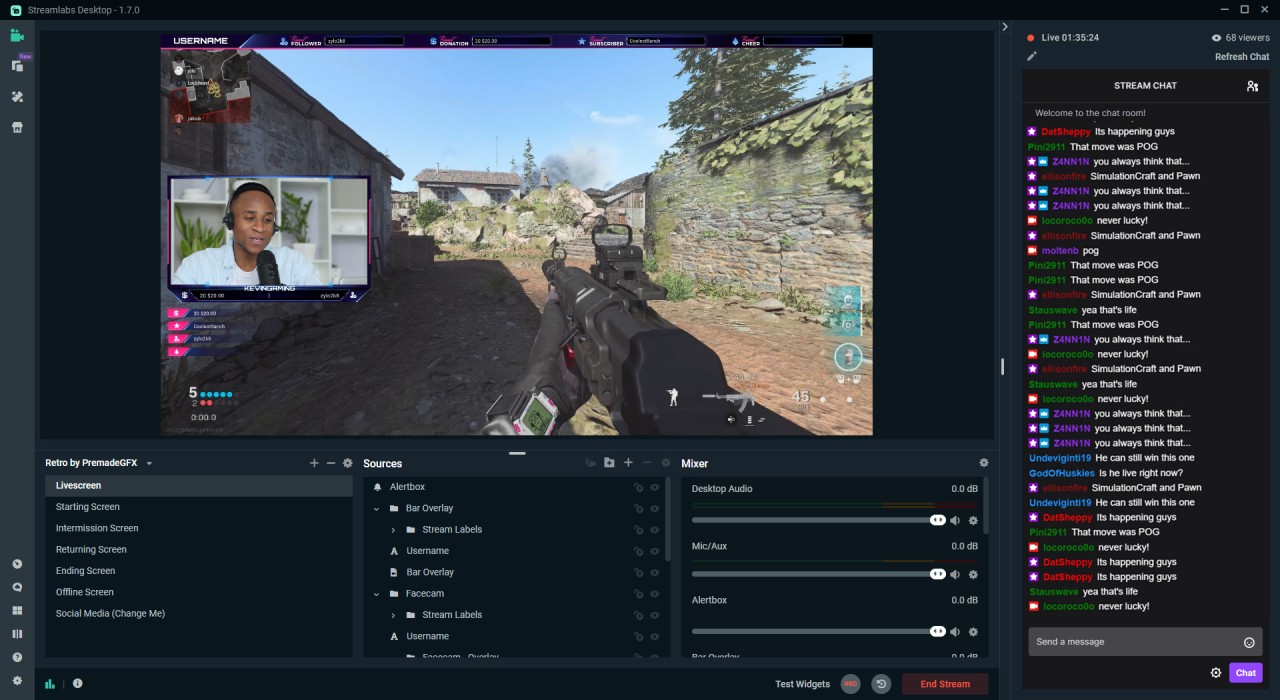
Streamlabs is an assortment of streaming and content-creation applications that you can work with under a single user ID. Users find it useful when they need to share gameplay, podcasts, or any other type of live content without installing any additional software. The concept is straightforward: everything you need is available in a single page: live-stream, notifications, chatbots, layouts, video editors, and audio settings; thus, you don’t have to download numerous applications, because Streamlabs offers every tool at once.
Users prefer Streamlabs as it seems easier to use than the installation of OBS Studio. Furthermore, Streamlabs offers a web version and mobile apps so as not to install large software. It is all about convenience: click, create a scene, drop overlays, go-live.
The platform also contains built-in audience development features, including tipping pages, customized widgets, and the multistream feature to reach several platforms simultaneously. It is user-friendly, but at the same time, it is also useful to mid-level users who can use it to create faster workflows without wasting hours adjusting settings. To sum up, Streamlabs is not an application but a platform that facilitates streaming and editing.
What Are the Key Features of Streamlabs?
The primary feature that is mentioned is the multistream option, where you can stream to YouTube, Twitch, Facebook, and other channels at the same time. This comes in useful when you need to communicate with many audiences without having to open a number of applications. The overlays and themes render the streams to appear organized to both amateurs who do not have the graphic design expertise. Streamlabs packages dozens of them, and the Ultra catalogue can be paid for even more.
Another strength is the alert system: follower alerts, subscriber pops, tipping, and animated alerts are all on the screen without any manual intervention. There is a built-in chatbot named Cloudbot, which can be used to perform chat moderation and commands. Streamlabs also has a small app store where you can add tools to add analytics, automation, viewer interactions, and additional broadcast controls. Regular workflow is a selling feature — one can record or broadcast in Streamlabs Desktop and then toggle over to its video or podcast editor without leaving the platform.
Inviting guests is easy through a common link, and mobile users can stream through their phones or may add a phone as an extra camera. All these mini-tools are glued to each other to make the streaming look less dishevelled.
Is Streamlabs Free to Use?
Yes. The free version of Streamlabs provides coverage of the basic streaming requirements, such as overlays, widgets, chat features, and access to the desktop, mobile, and browser apps. Most of the advanced details, such as multistreaming, premium overlays, and longer uploads, some analytics tools, and increased editing capabilities, are necessitated by Streamlabs Ultra. Amateurs are allowed to remain on the free plan, although to access all features, Ultra is required for full-time creators.
Which Platforms Support Streamlabs?
Streamlabs operates on various platforms due to the fact that it is not a single program. Streamlabs Desktop is a software that is compatible with Windows and macOS and is primarily used by people who have capture cards, webcams, and complete systems. The Talk Studio is a web-based application that is used to manage live streaming with guests, simple scene manipulation, and layouts without installing heavy software on users who do not need it.
iOS and Android mobile applications allow a user to stream games or IRL content in real time. A console-based one is directly linked to Twitch, which is utilized by console gamers without a computer. Streamlabs is aimed at connecting with a variety of audiences and is connected with Twitch, YouTube, Facebook, and others. Other tools, such as Cross Clip, Video Editor, and Podcast Editor, are all browser-based and can therefore be used on any device. In general, Streamlabs is indeed multi-platform, operating on desktop, mobile, console, and browser platforms.
What Are the Best Alternatives to Streamlabs?
OBS Studio is the entry-level open-source broadcasting tool that many streamers begin with due to its free nature, versatile nature, and power when you are ready to dig into the settings. It does not pack overlays or an app store like Streamlabs, but it provides the ability to fully control scenes, sources, transitions, plugins, audio routing and encoding. Users interested in having no restrictions set up prefer OBS due to the lack of subscription restrictions, the huge amount of available plugins, and the ability to operate on older systems. OBS is more suitable when the user wants to have full customization and does not mind that it will require them more time to make everything work manually.
Many creators download OBS Studio because it’s free, flexible, and fully customizable.
Camtasia Studio is not a streaming solution, but a suite of screen-recording and video-editing tools that is an all-in-one tutorial, product demo, or explainer video or long-form screen-based content. It provides clean and professional editing, transitions, annotations, cursor effects, voiceovers, and timeline tools that can be used to produce clean and teaching videos. Although not a live streaming software, Camtasia is suitable for creators who capture their screen and edit all the information outside the studio. Other streamers record using Streamlabs and then switch to Camtasia to refine the final product, and then upload to YouTube. It is commercial but is viewed as user-friendly as opposed to sophisticated editors.
Many users download Camtasia when they need smooth screen recording and polished editing in one place.
The Wirecast live streaming application is a professional-level tool created by Telestream that is used by organizations, churches, sports broadcasters, and those to handle a more formal stream. It favors multi-camera systems, NDI, instant replay, advanced audio routing and high-quality productions. Wirecast, unlike Streamlabs, is more about full production control, scheduling, and polished appearance as opposed to novice convenience. It has a powerful switching apparatus and layer-based editing like a studio. Wirecast is commercial software and comes in different license variations, and should be used by users who require broadcast-quality reliability and not template-driven workflows.
Professionals download Wirecast for stable, high-end production tools suitable for formal broadcasts.