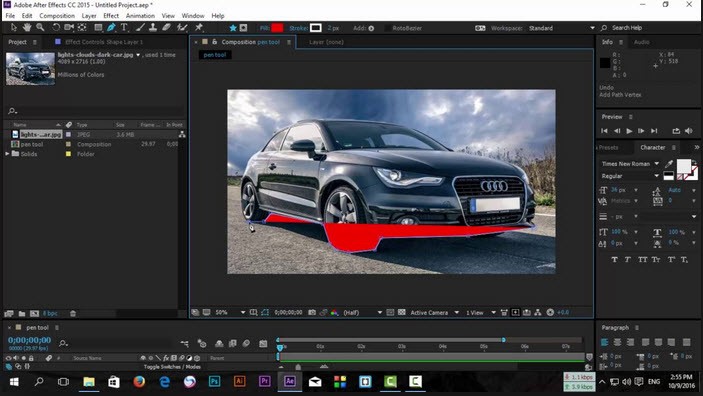
Adobe After Effects is a software application that is utilized in the production of motion graphics, cartoonized texts, and video effects. It does not work like a conventional video editor that splices the clips or organizes the timelines to tell the stories. Rather, After Effects is layered, allowing you to create an animation or an effect in layers.
It can be utilized by people for intros, transitions, logo animations, atmospheric effects, compositing, masking, or even in 3D elements they add to their shots. It has existed for decades and is a mainstream item in TV, film, and YouTube content creation and is used by design studios.
The program is placed between the creative and technical work. It is possible to bring to life simple shapes, make elaborate title sequences, and add several visuals in just one scene. After Effects also allows motion tracking, and therefore, you can place effects or graphics onto moving objects. It is commonly used by many visual effects artists to put fog, fire, rain, glows, sparks, or surreal effects on the scene.
Although it may seem threateningly difficult to use initially, the interface is more transparent with practice. The users tend to begin with text animation or plain graphics and then progress slowly to the more advanced effects.
What Are the Key Features of Adobe After Effects?
The possibility of making things move, virtually everything, is one of the key characteristics. Each layer may be shifted, rotated, scaled, dissolved, distorted, masked, or manipulated with time. They accomplish this by keyframes, which instruct After Effects on how an object is to vary from one frame to the next. Logos, drawings, typography, characters, shapes, or imported artwork from other Adobe applications can be animated.
The other great feature is the visual effects library. It has hundreds of built-in effects on color, light, distortion, particles, stylization, tracking, and composing. Lighting, glows, blur trails, noise, lens flares, shadows, and others can be generated by users without additional software. To work with footage, After Effects is also available to provide features of rotoscoping, green-screen extraction, motion tracking, and stabilization to enable integration of 2D and 3D elements into scenes as naturally as possible.
A simplified 3D space is also supported by the program. You are able to work in 3D layers, add lights, cameras, and shadows, or combine 3D and flat artwork. This makes it possible to have more realistic motion graphics. Recently, Adobe has boosted preview playback, minimized the number of pauses, and enhanced color control to ensure that images remain the same across applications.
The other significant attribute is that it has to be integrated with the rest of Adobe Creative Cloud. After Effects is compatible with Photoshop, Illustrator, and Premiere Pro. Layered PSD files are importable and can be animated in individual layers. Adobe Dynamic Link With Premiere Pro, you can use After Effects compositions within editing projects without rendering, accelerating the process of collaborating and saving time in the process of revision.
Is Adobe After Effects Free to Use?
Adobe After Effects is not a free product. Only via subscription can it be accessed. Adobe offers a 7-day free trial with the complete version of the software; therefore, users are at liberty to test, experiment with tutorials, or try motion design before they pay. After the trial is finished, one will be required to subscribe. After Effects is available separately or as a component of the complete Creative Cloud license, which brings with it Premiere Pro, Photoshop, Illustrator, and other applications.
Which Platforms Support Adobe After Effects?
You can download After Effects for Windows and macOS. The versions are similar in their functioning and come with the same tools. In the case of Windows, it needs a fairly new operating system and a modern computer, as the program is designed to use heavy graphics processing. The macOS version is compatible with Intel and Apple Silicon computers, and Adobe has been working to optimize its software to work with newer chips.
There is no Linux version. It does not have a mobile version either; After Effects is not available on mobiles due to the nature of motion graphics and VFX work, which usually demands powerful hardware. The preparation of assets on other devices, such as images or sketches, by the users is still possible, but the process of animation and effects is done on a computer. After Effects also depends on GPU acceleration for numerous effects, and thus an accepted graphics card will enhance its performance considerably. Overall, it is most effective in systems that have a sufficient amount of memory, a CPU, and hardware that is not outdated.
What Are the Best Alternatives to Adobe After Effects?
PowerDirector is mainly a video editing program, but it has a wide range of motion graphics and visual effects features, making it a choice for users who desire to perform editing and animation within a single program. It is included with transitions, title templates, particle effects, a chroma-key remover, and a bit of basic motion tracking. PowerDirector is simpler and more user-friendly than After Effects, and the presets are less manual in terms of animation. It is a good fit with content creators who require fast outcomes rather than in-depth control. Many creators download PowerDirector when they want quick effects without learning advanced motion design.
DaVinci Resolve is also associated with color grading and editing, and it features Fusion, a node-based compositing environment. Fusion has a set of motion graphics, 3D compositing, visual effects, particles, and high-end keying. In contrast to After Effects (a layer-based application), Fusion applies node connections between effects and elements, providing more flexibility and control but at a higher learning curve. Resolve is popular among professionals working with films, and it is among the limited number of tools that provide color grading, audio mixing, and VFX features within a single application. The entry-level of Resolve Fusion is free, which is why it is also attractive to those who do not want to spend on subscription fees but need an excellent visual-effects tool. Users often download DaVinci Resolve for its free professional-grade tools without requiring a subscription.
Blender is a free and open-source program for 3D, which also features a video sequencer and a compositor. Although most commonly used in 3D modeling, animation, and rendering, Blender is also capable of generating motion graphics and visual effects. It has a node-based compositor that enables the masking of footage, tracking, and combining of footage. The 3D workspace of Blender is also powerful and supports complete cinema scenes, lights, physics, and simulations. Although it is not the same workflow as After Effects, many creators use Blender to make effects such as smoke and particles, 3D text, and rigid-body motion and export the work to the editing software. Many artists download Blender to experiment with 3D effects and simulations at no cost.