Nintendo Switch Parental Controls is a smartphone app that gives parents oversight and authority over how children use a Nintendo Switch or the upcoming Switch 2. It does not block or censor games by default; instead, it puts practical tools in adult hands so families can decide their own boundaries.
Parents install the app on their phone and pair it with the console. From there, they can see how long a child plays each day, cap the number of hours, restrict games by age rating, and approve or deny gaming sessions remotely. All of this happens through the phone rather than through the Switch menus themselves.
The approach is about supervision rather than heavy-handed control. Parents can review which games were played, see how long each session lasted, and receive alerts when a time limit is hit. For younger children, online communication, voice chat, and video chat can all be blocked or held pending parental approval. Spending controls prevent unplanned purchases. The app is designed to let children enjoy gaming while giving families the tools to build healthier habits and keep content age-appropriate.
What Are the Key Features of Nintendo Switch Parental Controls?
The app is built around three core principles: visibility, safety, and balance.
Visibility means parents always know how their child is spending time on the console. Rather than offering a rough estimate, the app presents a daily breakdown of play activity and generates a monthly summary. Alerts go out when the console is still running past a set time, and when a child reaches a daily limit, the app can either show an on-screen reminder or suspend play until a parent lifts the restriction.
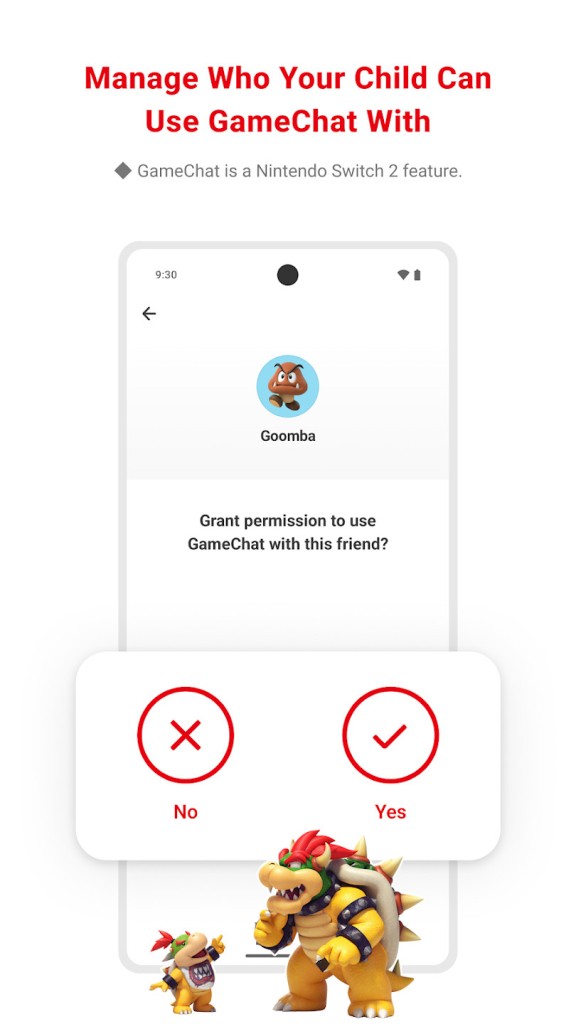
Safety is handled through communication controls. GameChat on the Switch 2 enables voice and video conversations, and for children under 16, every chat session requires parental approval before it can begin. Parents can see who their child is talking to and for how long. Communication can be switched off entirely or set to require permission each time, depending on what works best for the family.
Balance comes from content management. Parents can select from preset age rating thresholds that automatically block games above a chosen level, or manually whitelist specific titles. The app also applies controls to Nintendo eShop spending, preventing children from making purchases without oversight.
Is Nintendo Switch Parental Controls Free to Use?
Yes, the app is completely free. There are no subscription fees for playtime management, communication controls, or spending limits. All that is needed is a Nintendo Account held by an adult. Once the app is linked to the console, the full set of controls is available at no cost. Nintendo updates the app automatically when new features are added, or new hardware like the Switch 2 is supported.
Which Platforms Support Nintendo Switch Parental Controls?
The app runs on iOS and Android phones and tablets, so parents can manage settings from their own device without needing to touch the console. After installing the app, an adult signs in with a Nintendo Account, links it to the console, and immediately gains access to activity data and all controls. No computer is required, and nothing needs to run on the Switch itself.
The app works with both the original Nintendo Switch and the Switch 2. Nintendo is committed to keeping it updated as Switch 2 features roll out, including GameChat and video communication tools. While the console itself includes some built-in controls, the app offers a wider range of settings and is the more complete management tool of the two. Families with multiple Switch consoles can transfer settings when upgrading. The app also supports game whitelisting and save data transfer during system migrations.
What Are the Best Alternatives to Nintendo Switch Parental Controls?
Microsoft Family Safety is a broader parental control tool that works across Windows PCs and Xbox consoles. It tracks screen time across multiple devices, manages app permissions, monitors browsing history, and covers spending. For Xbox households, it functions similarly to the Nintendo app, allowing time limits on gaming and controls over online communication. Parents receive activity reports showing which games were played and for how long. The app goes beyond gaming to include location tracking and general family scheduling, making it a wider family management tool rather than a gaming-specific one.
Google Family Link covers Android phones, tablets, and Chromebooks rather than consoles. It focuses on mobile app downloads and permissions, notifying parents whenever a child tries to install a new game or app and giving them the option to approve or block it remotely. Daily screen time reports show which apps were used and for how long. Family Link does not extend to Nintendo Switch or Xbox, but it is useful for families where most gaming happens on mobile devices. It can also restrict access to digital storefronts and block in-app purchases.
PlayStation Family is Sony's equivalent of the Nintendo app, built specifically for PS4 and PS5. It lets parents set play schedules, restrict communication, cap spending, and control which games are accessible based on their age ratings. Activity reports and privacy setting management are also included. The main difference in approach is that PlayStation Family leans more heavily toward real-time approval, where parents actively grant or deny game requests and time extensions as they come in. Nintendo's app tends to favor pre-set rules with flexible structure, while PlayStation Family puts more emphasis on moment-to-moment permission and oversight.