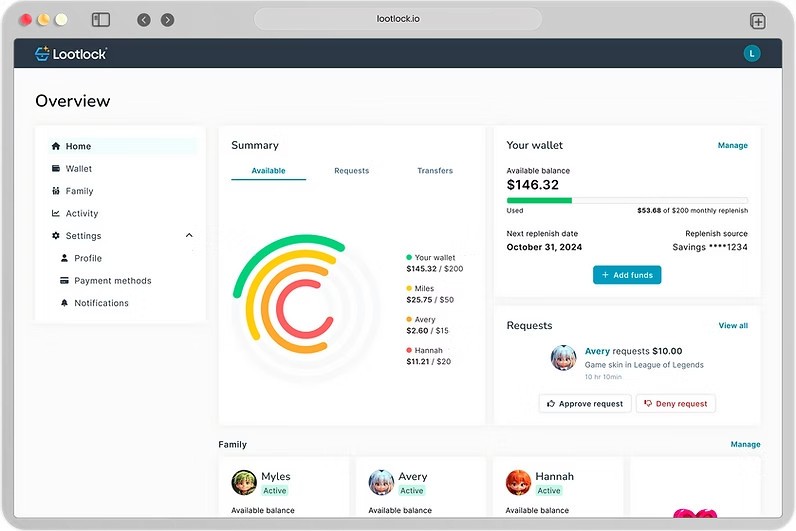
Lootlock is a financial management and budgeting app that is tailored to families with children who have in-game purchases. Lootlock is not about limiting the number of hours one spends playing games or prohibiting access to specific content, such as the ones that parental control software provides. It provides the parents with a means to monitor spending by establishing a common digital wallet and giving allowances/budgets that children can spend on games or in-game purchases. The platform also provides children with some level of independent control to enable them to make choices within their boundaries.
Lootlock does not attempt to prevent children from spending money; instead, it attempts to educate them about being financially responsible. Parents determine the amount to be placed in the wallet, the frequency of such allowances, and the need to seek further authorization of additional funds.
Children receive an open dialogue about their expenditure and understand the effects of having a budget. Moreover, they do not need to request money over and over again; rather, they can earn money by doing chores or getting what the app calls a bounty, which is then turned into available spending.
It is just a spending device in the form of a gaming companion that provides structure to the manner of digital spending. Families gain access to the purchases, and children receive a system that enables them to train in making financial decisions without losing control.
What Are the Key Features of Lootlock?
Lootlock prioritizes spending and financial literacy instead of limiting games. Budget management is one of the main characteristics. A parent may give spending limits for each child on a monthly basis, as a sum on all games, or as varying limits on various games. After setting the budget, the Lootlock takes care of the rest. Once the cash is lost, it is lost. When a child desires something additional, he or she has to request it, and the parent may either accept the request or not.
The other characteristic is the allowance system. Parents can set up scheduled automatic allowances, which are deposited in the wallet at the frequency they are willing to schedule. The child will have a complete picture of the amount left, and the parent will have an idea of where every purchase went. This makes spending a learning process, since it makes people think harder than they would have done with impulse buying.
Bounties are also found in Lootlock. A parent develops real-life assignments that should be done in exchange for more money or a reward. Children do not receive money and buy games; they get it by completing the tasks. The application introduces a feedback mechanism to make children correlate actions and consequences.
Finally, Lootlock is a spending analytics company. Parents are able to see where the money is being spent, how frequently, and which games are spending the most funds. This involves the comparison with other users so that parents can get to know whether the level of spending is average or abnormal.
Is Lootlock Free to Use?
Lootlock is not completely free at all. It has a free tier, which comes with basic spending controls but with limited features. The free option has restrictions on the child profiles and wallet size. Paid plans also allow more features, including request-for-funds, monthly budgeting, bounties, and increased wallet boundaries. It is priced on a cost per child basis, and households can only pay for any number of profiles they use. There are future characteristics that are associated with advanced levels.
Which Platforms Support Lootlock?
Lootlock is a web and application site. To access the service, the parents make an account on the Lootlock website or app and attach the wallet to the payment options accepted. Children use the same service to interact with their part of the platform on a smart device or a computer. The platform is independent, and it does not need platform-specific parental control. It runs a non-game console, i.e., not on a PlayStation, Xbox, Nintendo Switch, or Android device. Rather, it controls expenditure in the area of payment: via the wallet system and bank transfer integration in Lootlock.
The web dashboard or app gives the parents an overview of the activity and enables them to approve or reject the spending requests. Children get a watered-down representation of their budget, earned money, bounties, or wallet amount. Lootlock depends on the banking systems to fill the wallet with the help of a secure payment system, instead of keeping the data about the card within a console. The platform does not limit the content or block games; it only engages with purchasing behavior.
What Are the Best Alternatives to Lootlock?
Android apps and devices are well supported by Google Family Link. It is not aimed at spending on analytics and financial literacy, but it does enable parents to block unwanted purchases and approve or deny downloading apps. Screen time can be regulated during the time spent with the children, devices can be locked, and any so-called in-app purchases can be blocked by asking parents to approve each purchase. Google Family Link is more concerned with content regulation and governing the behavior of the device, whereas Lootlock is more concerned with the budget and spending patterns. It is effective when the purpose is not educating about responsible spending, but restricting access to the apps.
PlayStation Family is a parental control feature on PlayStation consoles made by Sony. It enables parents to limit internet communication, allow or deny access to the games, and establish playtime regulations. It also has spending limits associated with the PlayStation Store wallet, and thus, children have no power to spend money without permission. Nevertheless, PlayStation Family is not a budgeting and expenditure behavior tracker. It merely blocks or allows purchases. Lootlock provides the child with some form of freedom because the child is provided with a budget to operate within, whereas PlayStation Family is fully controlled by the parent.
The Nintendo Switch ecosystem is the center of attention of Nintendo Switch Parental Controls. It allows parents to check the playtime, view the recently played titles, enable or block communication capabilities, and block e-shop purchases. The app made by Nintendo provides access to what children play, and it has been used to control the activity of children online. Lootlock and Nintendo Switch Parental Controls are used to achieve different goals: Nintendo emphasizes proper and adequate gameplay, whereas Lootlock is preoccupied with responsible expenditure.
Microsoft Family Link Safety targets families with the use of either Xbox or Windows products. It monitors screen time, time spent on gaming, and online interactions. It allows parents to restrict expenditure on purchases from the Xbox and Windows Store. Microsoft Family Safety provides wider digital monitoring than gaming, and includes more platforms, but not in-game spending. Lootlock, however, revolves completely around monetary management and how to handle money in the world of games.