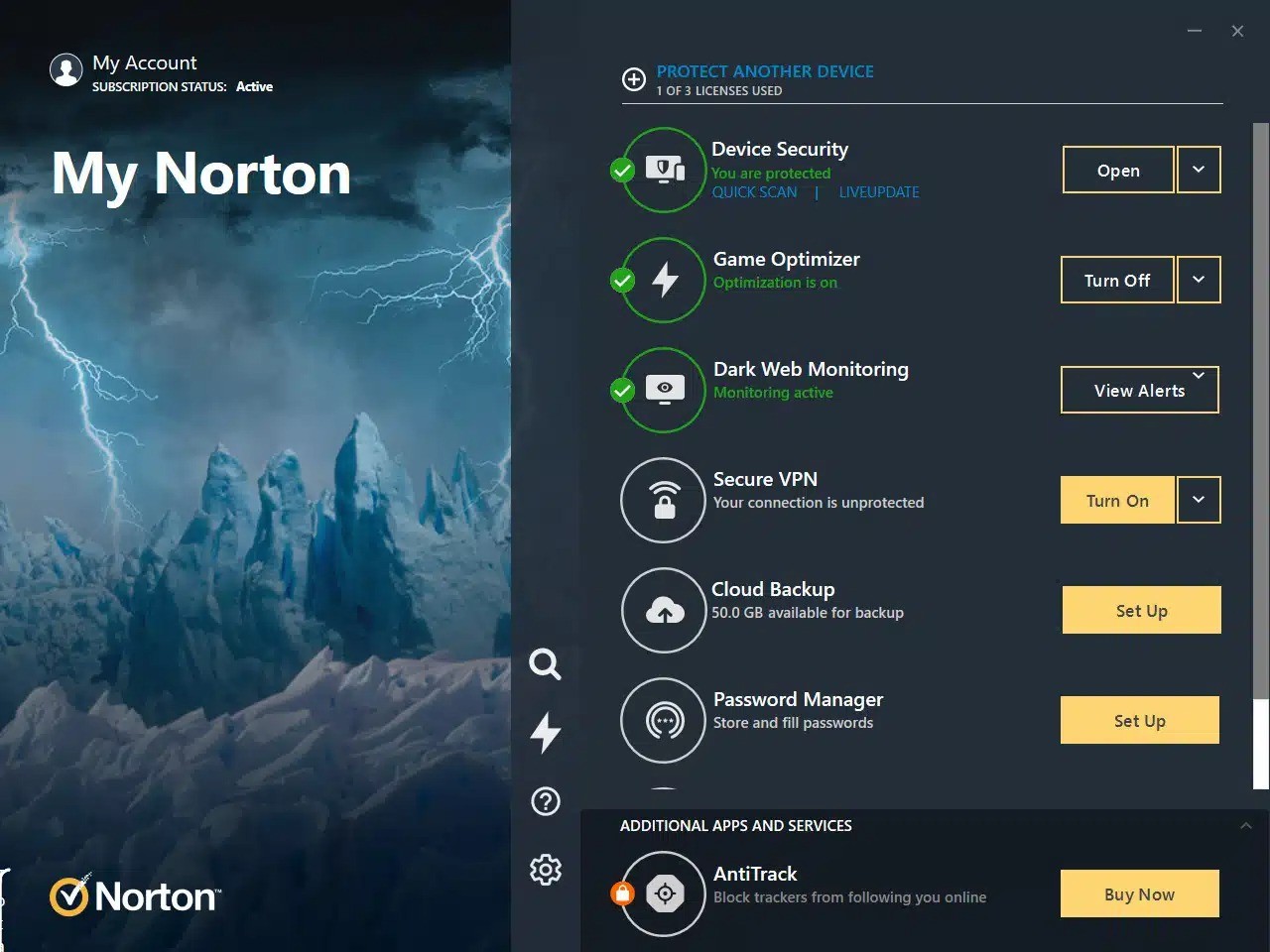
The Norton 360 Gamers is a security package that was designed to suit PC gamers who do not want to be interrupted with antivirus pop-ups or face decreased performance when they are gaming. Instead of being a mere antivirus which reads and scans the computer only to identify a threat, the game-oriented version includes security, privacy software, cloud backup, and a performance optimization package named Game Optimizer. It is quite straightforward: safeguard your identity, your game accounts, and your device without being noticed during gameplay.
It is not necessary to be a hardcore gamer to use it. It can be beneficial even to the users who play online games only occasionally or install the mods that are available on third-party sites. Games entail accounts, friendships, payment mechanisms, chat messages, and community tools, and all these may be exploited by phishing or malware. The software consequently strikes a balance between protection and performance and does not require the user to make a choice.
Norton 360 for Gamers, unlike normal antivirus software, tries not to interrupt the game. It identifies full-screen mode and goes ahead and mutes non-critical messages until the game is closed. Dark Web Monitoring is an automated service that constantly searches through stolen and leaked gamer tags, emails, usernames, or any other personal information associated with gaming accounts. The application works quietly in the background and only interferes when the need arises; that is the point. It provides safety without interrupting your gaming progress.
What Are the Key Features of Norton 360 for Gamers?
The most prominent characteristic is Game Optimizer, which enhances the performance of a game by giving more CPU resources to the game and restricting background processes, which usually drain resources. It does not improve hardware, but when numerous apps are deployed, it does not allow them to compete for system resources. This can be used to ensure that the gameplay is smoother on midrange PCs.
Dark Web Checks if your Gamer tag/ personal information is featured in hacked databases. In the case that an account or email is compromised, it is notified through the software, and you are able to switch passwords before the damage is further inflicted. It is handy when one uses credentials on many platforms.
Webcam Protection warns you against the applications that are trying to use the webcam without authorization. This can be of use to streamers and content creators because unauthorized access might expose them to privacy problems and embarrassment.
Other plans include a secure VPN. It covers your IP address to minimize the risk of DDoS or doxing, or location tracking connected with the internet. A built-in VPN makes it less exposed to competitive gamers or users of public Wi-Fi.
Cloud backup is used to store video clips or other large files online to avoid congesting a gaming SSD. Notification optimization makes alerts minimal in the gameplay, and FullScreen Detection minimizes interruption.
Is Norton 360 for Gamers Free to Use?
No. Norton 360 for Gamers is a subscription-based product, having different price points that differ based on the number of devices and features offered. Discounts can apply in the first year, and once the trial or discount period is over, the subscription will be renewed at the usual price unless you cancel.
Which Platforms Support Norton 360 for Gamers?
Norton 360 for Gamers is compatible with several operating systems. You can download it for Windows, macOS, Android, and iOS. The gaming-oriented features, like Game Optimizer are used on Windows PCs, which are most likely to have performance bottlenecks. The entire advantage of the optimization tools will be applied to a Windows gaming desktop or laptop. Norton also has security, VPN, password manager, and dark web monitoring, as it can be installed on phones and tablets as well.
Most protection features are provided to Mac users, with PC gaming being the main target of performance enhancements. Windows and mobile gadgets have parental controls and screen-time aids that allow parents to control the amount of time children spend playing games. The application does not substitute antivirus software on game consoles such as PlayStation, Xbox, or Nintendo Switch, as such systems operate under closed platforms.
Nevertheless, the software secures accounts associated with those consoles, since information breaches and stolen credentials may take place beyond the console. In general, the software allows working with multiple devices, and the entire functionality of gaming is unique to Windows.
What Are the Best Alternatives to Norton 360 for Gamers?
Avast Ultimate is an antivirus package that aims to protect devices, privacy-related applications, and the performance of the gadgets. It has a VPN, antivirus, and a clean-up tool that eliminates junk files and cleans up the system. Avast is not professionally advertised as Norton 360 to Gamers, which some people like due to the absence of the gaming-themed upsell. Avast is a background scanner and has a minimal scanning engine. It implements password control and ransomware as well. The interface is also easy, and the cleanup utility assists in performance by eliminating unnecessary start-up processes. Avast Ultimate is an easy solution when a user does not require the gamer identity branding but would like to buy a privacy and security package.
The easiest one is AVG Free Antivirus, and it is entirely free. It deals with the fundamentals: malware scanning, link safety checks, and preventing suspicious downloads. It does not have a VPN, a password manager, or a cloud backup. AVG does not have any gaming optimization settings, but it has a silent mode that minimizes notifications. It may be a good alternative for a person who is not interested in subscriptions and additional privacy protection. It is not geared towards gamers in particular, but it does not cause a heavy load to the system, which maintains the gaming performance. In the event that the objective is to protect themselves against antivirus software only, with no other packages, AVG is the least trouble-making option.
In independent laboratory tests, Bitdefender Total Security usually performs well in using good malware detection with low performance cost. It offers anti-ransomware, VPN (governed by the data-use levels of the plan), parental controls, and system optimization services. Its Autopilot mode is one of the advantages, as it allows a driver to decide independently when configured. It also has a gaming mode, which minimizes notifications, suspends background activity, as well as delays scans during a running game. Bitdefender also concentrates on effective protection, as opposed to integrating security and identity tracking. In case a user is interested in the highest level of malware detection with a minimum of CPU influence, Bitdefender Total Security can be considered a good competitor.