Running out of storage on your Mac can make it difficult to install updates, download files, or manage applications. Before deleting files at random, it helps to understand what's actually using your disk space. DaisyDisk is a disk space analyzer for macOS that scans your drives and presents storage usage in an interactive visual interface.
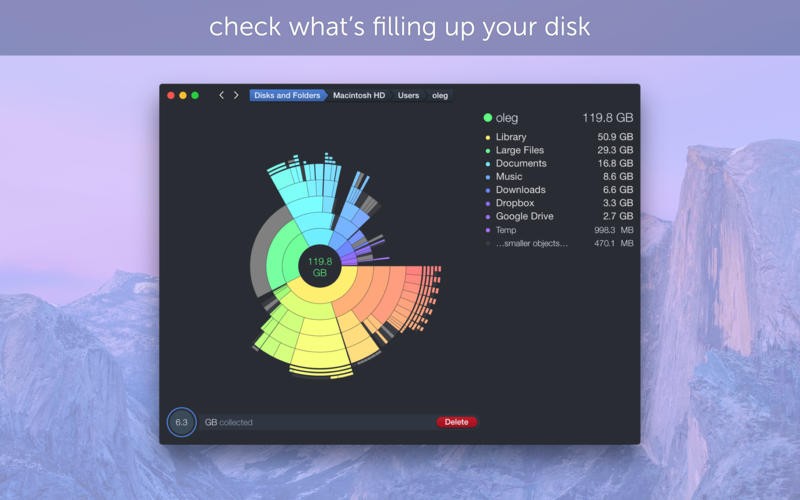
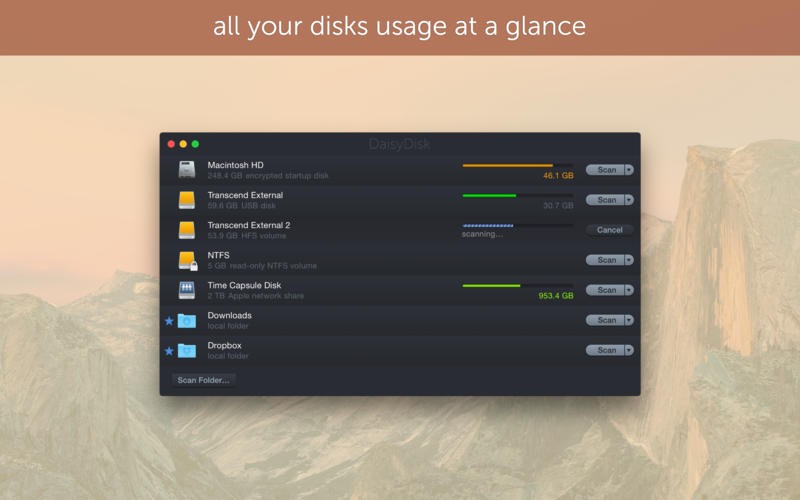
The app is designed to make disk cleanup straightforward. Its graphical breakdown helps you identify large files and folders, inspect their contents, and decide what you no longer need. You can also scan as an administrator to investigate restricted locations, examine macOS System Data, and find snapshots that may be occupying storage. DaisyDisk supports internal and external drives, different storage devices, and connected cloud storage services, including Dropbox, Google Drive, Microsoft OneDrive, and Box.
Unlike traditional cleaner utilities that focus on clearing caches and temporary files, DaisyDisk concentrates on helping you locate files that take up significant space. You remain in control of what gets deleted, while built-in safeguards help protect system files.
What Are the Key Features of DaisyDisk?
DaisyDisk's main feature is its visual disk scanner, which gives you a clear overview of how storage is distributed across your drive. Instead of navigating through folders individually, you can explore a graphical representation of your disk to identify space-consuming files and directories. Selecting items helps you investigate what's taking up room and decide whether you want to remove them. The interface is designed to make the process accessible, even if you aren't familiar with disk management tools.
Fast disk scanning helps you identify storage problems without waiting for a lengthy analysis. DaisyDisk is designed to scan drives in seconds, allowing you to locate large files and folders quickly. It can also calculate physically used disk space more precisely by accounting for clones and hard links that don't consume additional storage. Administrator scanning lets you investigate restricted files and folders that regular scans might not reveal. This can be useful when your Mac reports that storage is being used, but the usual tools don't provide a clear explanation. DaisyDisk can also break down macOS's System Data and Other storage categories, helping you investigate files that aren't easy to identify through the standard storage overview.
Drive and cloud storage support gives you more flexibility when analyzing storage. You can inspect internal and external drives, SSDs, HDDs, USB and Thunderbolt devices, network storage, and virtual disks. The app also supports scanning connected cloud storage services, including Dropbox, Google Drive, Microsoft OneDrive, and Box.
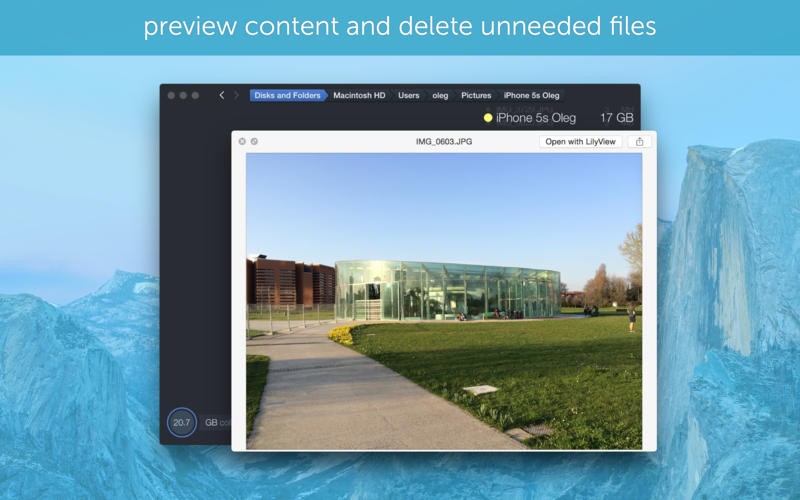
File previews and snapshot management provide additional ways to investigate disk usage. You can preview files instantly using the Space key before deciding whether to keep them. DaisyDisk can also help you find and remove macOS snapshots that may be taking up significant storage space.
Is DaisyDisk Free to Use?
DaisyDisk offers a free trial, but continued use requires a paid license. There is a one-time payment to acquire the license with no recurring subscription. It includes minor updates and bug fixes and can be used on up to five personal Macs. A 30-day money-back guarantee is also advertised.
Which Platforms Support DaisyDisk?
DaisyDisk is designed specifically for Apple computers running macOS, you can't download it on any other OS. Its stated minimum requirement is macOS 10.13 or newer, and it supports both Intel processors and Apple Silicon.
What Are the Best Alternatives to DaisyDisk?
CCleaner is a system maintenance utility that focuses on removing unnecessary files and helping users manage their computers. It can be useful if you want a broader cleanup tool rather than a dedicated visual disk analyzer. Depending on the version and platform, its features may include temporary file removal, application management, and other maintenance functions. Compared with DaisyDisk, which emphasizes identifying large files and letting you decide what to delete, CCleaner is more focused on streamlining routine cleanup tasks.
BleachBit is an open-source cleanup utility designed to remove unnecessary files and help users reclaim disk space. It can clear caches, temporary files, and other data generated by applications, making it a useful option for people who prefer free software. Its approach differs from DaisyDisk's visual analysis: rather than primarily mapping storage usage to help you locate the largest files, BleachBit focuses on cleaning supported categories of data. This makes it suitable if you already know which types of files you want to remove or want more direct control over routine cleanup.
Advanced SystemCare is a PC maintenance utility that combines cleanup functions with additional system optimization tools. It's an option for Windows users who want to manage junk files alongside other maintenance tasks, rather than concentrating solely on analyzing disk usage. Depending on the edition, it may include features for privacy protection, performance optimization, and system maintenance. DaisyDisk is more specialized: it provides a visual breakdown of storage and helps you identify large files that you can review and delete manually.