Easy Gamer Utility is a Windows utility designed to bring several common PC gaming tasks into one place. Rather than switching between Windows settings, game launchers, cache folders, Task Manager, and troubleshooting tools, you can use the app to prepare your PC, manage games, clean temporary files, and investigate common problems.
The software comes from ComputerSluggish and is designed for Windows 10 and Windows 11. Its main tools cover game boosting, game cleaning, game launching, diagnostics, network checks, and game fixing. There is also a built-in mini game with its own progression system, giving the utility an unusual extra feature beyond its practical PC tools.
What Are the Key Features of Easy Gamer Utility?
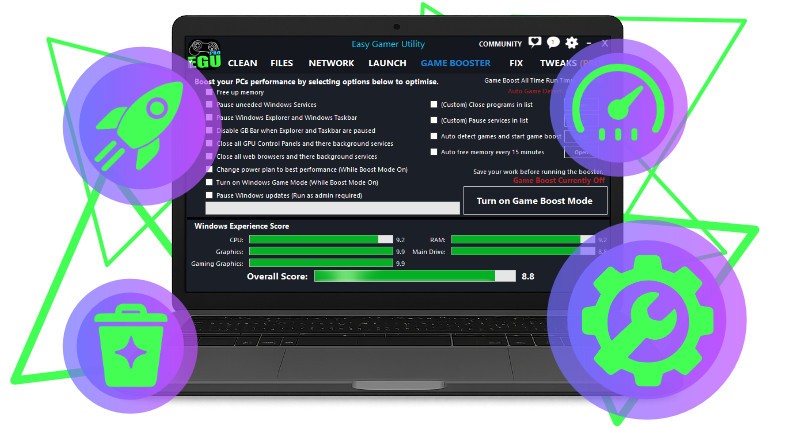
Easy Gamer Utility's Game Booster provides controls for preparing Windows before launching a game. You can free unused memory from eligible applications, access Windows Game Mode and power-plan settings, and reduce selected background activity. The app lets you choose which supported optimizations to apply rather than automatically applying hidden system tweaks. Basic Game Boost controls are available in the free version.
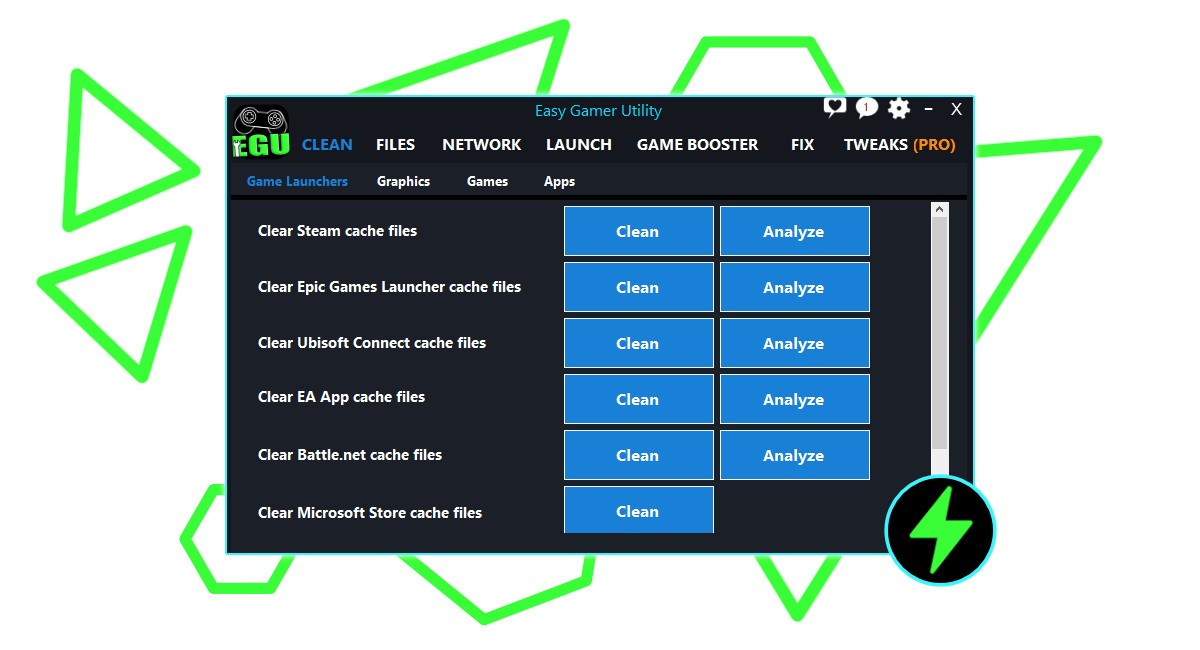
The Game Cache Cleaner is designed to remove temporary files created by games and launchers. It supports cleaning for Steam, Epic Games Launcher, Ubisoft Connect, EA App, and Battle.net, while also providing launcher, graphics, and advanced cleaning areas. You can analyze supported cache locations before deleting temporary data, which can help free up disk space without manually searching through Windows folders.
The built-in game launcher provides another way to organize your PC games. Easy Gamer Utility can detect supported games from platforms including Steam, EA App, Xbox App, Ubisoft, and Roblox, allowing you to view them in one library and launch them without opening each platform separately first.
Easy Gamer Utility also includes troubleshooting and diagnostic tools. Its game-fixing features can help with supported games, launchers, emulators, and custom Windows game executables, while separate PC Health and Network sections can help investigate problems outside the game itself. The app also includes a mini game where you can earn Performance Points, upgrade a virtual gaming PC, complete daily goals, and unlock features such as achievements, crafting, and a leaderboard.
Is Easy Gamer Utility Free to Use?
Yes. Easy Gamer Utility has a free version that includes gaming, cleaning, launcher, system, and troubleshooting tools.
The Pro version adds advanced Game Booster controls, High Priority Gaming Mode, save and configuration backups, additional gaming tweaks, extra game-fixing options, and other performance tools.
Which Platforms Support Easy Gamer Utility?
Easy Gamer Utility is designed for Windows 10 and Windows 11 PCs. It is not presented as a cross-platform gaming utility for macOS, Linux, PlayStation, Xbox, or other operating systems. Its tools specifically focus on Windows gaming, including Windows settings, game launchers, memory, background processes, network diagnostics, and Windows game executables.
What Are the Best Alternatives to Easy Gamer Utility?
PC Game Booster is another option for Windows users who want software focused on improving their gaming setup. While Easy Gamer Utility combines boosting with cleaning, launching, troubleshooting, and diagnostics, PC Game Booster is more directly centered around game performance optimization. It may therefore be worth considering if you mainly want a dedicated tool for preparing your PC before gaming.
GameBoost takes a similar performance-focused approach but puts more emphasis on optimizing system settings for games. Easy Gamer Utility provides a wider selection of everyday gaming utilities, including cache cleaning, game launching, diagnostics, and troubleshooting. GameBoost is more relevant if your main reason for installing this type of software is adjusting Windows and system settings for gaming performance.
Razer Cortex is another alternative for PC gamers. It combines game optimization with additional features designed around managing and improving the gaming experience. Compared with Easy Gamer Utility's broader collection of maintenance and troubleshooting tools, Razer Cortex is more closely associated with the wider Razer gaming ecosystem. It can be useful for users who already use Razer hardware or software and want their gaming tools together in one environment.